
JSP入门_Cookie_Session
JSP入门_Cookie_Session
本篇整理三部分内容:JSP 的脚本、原理与注释,Cookie 的概念与常用操作,以及 Session(会话)的概念、原理与登录案例实战。
1. JSP 入门
1.1 概述
1.1.1 什么是 JSP
JSP(Java Server Pages)是 JavaWeb 服务器端的动态资源。它与 HTML 页面的作用是相同的:显示数据和获取数据。
1.1.2 JSP 组成
JSP = HTML + Java 脚本 + JSP 动态标签(包含 EL 表达式)。
1.2 JSP 脚本
JSP 脚本本质上就是嵌在页面中的 Java 代码片段,按写法分为三类:
| 写法 | 作用 |
|---|---|
<%...%> | Java 语句 |
<%=…%> | Java 表达式,等价于 out.print(...); |
<%!...%> | 定义类成员(成员变量、方法) |
JSP 中还有无需创建就可以直接使用的内置对象,例如 out 对象:它的作用是向客户端输出。<%=…%> 与 out.print() 的功能是相同的,都是向客户端输出。
<%@ page contentType="text/html;charset=UTF-8" language="java" %>
<html>
<head>
    <title>jsptest</title>
</head>
<body>
<h1>JSP演示</h1>
    <%
        // Java 语句
        String s1 = "hello jsp";
        // 不会输出到客户端,而是在服务器端的控制台打印
        System.out.println(s1);
    %>
    <!-- 输出到客户端浏览器上 -->
    输出变量:<%=s1 %><br/>
    输出int类型常量:<%=100 %><br/>
    输出String类型常量:<%="你好" %><br/>
    使用HTML直接输出常量<span>100</span>
</body>
</html>
在一个 JSP 中,多个 <%...%> 脚本块可以一起使用,例如用脚本把循环拆开、与 HTML 标签交错输出表格:
<%@ page contentType="text/html;charset=UTF-8" language="java" %>
<html>
<head>
    <title>jsp表格</title>
</head>
<body>
    <h1>表格</h1>
    <table border="1" width="50%">
        <tr>
            <th>序号</th>
            <th>用户名</th>
            <th>密码</th>
        </tr>
        <%
            for(int i = 0; i < 5; i++) {
        %>
            <tr>
                <td><%=i+1 %></td>
                <td>user<%=i %></td>
                <td><%=100+1 %></td>
            </tr>
        <%
            }
        %>
    </table>
</body>
</html>
1.3 JSP 原理
JSP 是特殊的 Servlet:当 JSP 页面首次被访问时,容器(Tomcat)会先把 JSP 编译成 Servlet,然后再执行这个 Servlet。所以 JSP 本质上就是一个 Servlet。
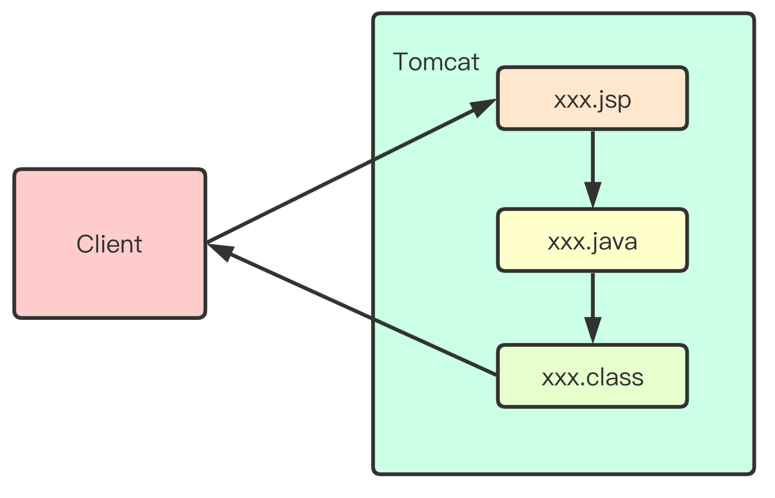
JSP 生成的 Servlet 存放在 Tomcat 的 work 目录下,它是 JSP 的"真身"。打开看看其中的内容,可以更好地理解 JSP 的工作方式:JSP 中的静态信息(例如 <html> 等标签)在"真身"中都是使用 out.write() 完成打印的,即这些静态信息都作为字符串输出给了客户端。
1.4 JSP 注释
JSP 注释的写法是 <%-- ... --%>,在 JSP 编译成 .java 文件时会被忽略。
也可以在 JSP 页面中使用 HTML 注释 <!-- … -->,但要注意:这个注释会保留在 JSP 编译成的 .java 文件中,不会被忽略,而且会被原样发送到客户端浏览器。
注
如果注释内容不想暴露给客户端(例如包含敏感信息或业务逻辑说明),一定要使用 JSP 注释 <%-- --%>,而不是 HTML 注释。
2. Cookie
2.1 什么是 Cookie
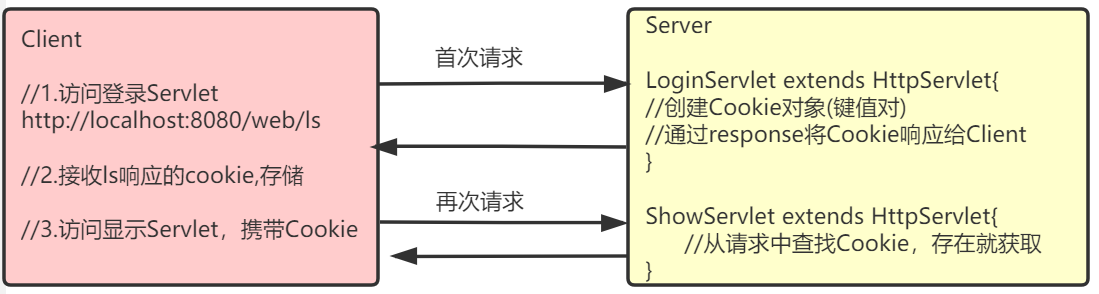
Cookie 翻译成中文是"小甜点、小饼干"的意思,在 HTTP 中它表示服务器送给客户端浏览器的一小段数据。
具体来说:浏览器访问 Web 服务器的某个资源时,Web 服务器可以在 HTTP 响应消息头中附带一小段数据传送给浏览器;一旦浏览器保存了某个 Cookie,那么它以后每次访问该 Web 服务器时,都会在 HTTP 请求头中把这个 Cookie 回传给服务器。一个 Cookie 主要由标识该信息的名称(name)和值(value)组成。
2.2 Cookie 规范
| 规范项 | 限制 |
|---|---|
| 单个 Cookie 大小 | 上限 4KB |
| 一个服务器在客户端浏览器上保存的 Cookie 数量 | 最多 20 个 |
| 一个浏览器保存的 Cookie 总数 | 最多 300 个 |
以上数据只是 HTTP 对 Cookie 的规范。在浏览器大战的年代,一些浏览器为了展现自己的能力,对规范做了一些"扩展",例如单个 Cookie 大小为 8KB、最多可保存 500 个 Cookie 等,但也不会出现把硬盘占满的情况。
注
不同浏览器之间是不共享 Cookie 的:使用 IE 访问服务器时,服务器把 Cookie 发给 IE 并由 IE 保存;之后使用 Firefox 访问服务器时,不可能把 IE 保存的 Cookie 发送给服务器。
2.3 Cookie 的常用操作
2.3.1 创建 Cookie
// 创建 Cookie
Cookie ck = new Cookie("name", "zs");
// 设置有效期:>0 有效期(单位秒);=0 删除该 Cookie;<0 内存存储(默认 -1)
ck.setMaxAge(-1);
// 添加到 response 对象中,响应时发送给客户端
response.addCookie(ck);
2.3.2 获取 Cookie
// 获取所有的 Cookie
Cookie[] cks = request.getCookies();
// 遍历 Cookie,检索出自己的 Cookie
String code = null;
if (cks != null) {
    for (Cookie ck : cks) {
        if (ck.getName().equals("name")) {
            // 记录 Cookie 的值
            code = ck.getValue();
            break;
        }
    }
}
2.3.3 修改 Cookie
只需要保证 Cookie 的名和路径一致即可修改:
// 同名的 Cookie 会覆盖原来的值
Cookie ck = new Cookie("name", "ls");
ck.setMaxAge(-1);
response.addCookie(ck);
2.3.4 Cookie 的生命
Cookie 不只有 name 和 value,还有"生命",即 Cookie 在客户端的有效时间,可以通过 setMaxAge(int) 来设置:
| 取值 | 含义 |
|---|---|
cookie.setMaxAge(-1) | maxAge 属性的默认值,表示只在浏览器内存中存活,一旦关闭浏览器窗口,Cookie 就会消失 |
cookie.setMaxAge(60*60) | Cookie 可存活 1 小时;生命大于 0 时,浏览器会把 Cookie 保存到硬盘上,即使关闭浏览器、重启电脑,Cookie 也会存活 1 小时 |
cookie.setMaxAge(0) | 特殊值,表示 Cookie 被作废:如果浏览器已经保存了这个 Cookie,可以用它来删除该 Cookie,无论其保存在内存中还是硬盘上 |
案例:设置并获取 Cookie。
// 设置 Cookie
@WebServlet(name = "AServlet", value = "/AServlet")
public class AServlet extends HttpServlet {
    @Override
    protected void doGet(HttpServletRequest request, HttpServletResponse response) throws ServletException, IOException {
        // 设置 Cookie
        Cookie cookie = new Cookie("name", "zs");
        // maxAge 为 -1 表示一旦关闭浏览器窗口,Cookie 就会消失
        cookie.setMaxAge(-1);
        response.addCookie(cookie);
    }

    @Override
    protected void doPost(HttpServletRequest request, HttpServletResponse response) throws ServletException, IOException {

    }
}

// 获取 Cookie
@WebServlet(name = "BServlet", value = "/BServlet")
public class BServlet extends HttpServlet {
    @Override
    protected void doGet(HttpServletRequest request, HttpServletResponse response) throws ServletException, IOException {
        Cookie[] cks = request.getCookies();
        if (cks != null) {
            for (Cookie ck : cks) {
                if (ck.getName().equals("name")) {
                    // 获取 Cookie 的值
                    System.out.println(ck.getValue());
                    break;
                }
            }
        }
    }

    @Override
    protected void doPost(HttpServletRequest request, HttpServletResponse response) throws ServletException, IOException {

    }
}
3. Session
3.1 什么是 Session
关于会话:
- 会话范围是从某个用户首次访问服务器开始,到该用户关闭浏览器结束;
- 会话对应一个用户对服务器的多次连贯性请求,所谓连贯性请求,就是该用户多次请求中间没有关闭浏览器;
- 可以类比为生活中的一次对话:开始对话、多轮交流、结束对话。
javax.servlet.http.HttpSession 接口表示一个会话,是 JavaWeb 提供的。Session 是服务器端对象,保存在服务器端。
3.2 获取 Session
在 Servlet 中通过 HttpSession session = request.getSession() 获取:如果当前会话已经有了 session 对象则直接返回;如果当前会话还不存在,则先创建 session 再返回。
在 JSP 中,session 是内置对象之一,不用创建就可以直接使用。
3.3 HttpSession 域对象功能
一个会话创建一个 HttpSession 对象,同一会话中的多个请求之间可以共享 session 中的数据。
到目前为止已经学习了三个域对象:request、session、servletContext,它们都有共同的方法:
| 操作 | 方法 |
|---|---|
| 存 | void setAttribute(String name, Object value) |
| 取 | Object getAttribute(String name) |
| 删除 | void removeAttribute(String name) |
如果需要在会话范围内共享数据,应该把数据保存在 session 中。
案例:演示 session 在同一会话的多次请求中共享数据。
@WebServlet(name = "CServlet", value = "/CServlet")
public class CServlet extends HttpServlet {
    @Override
    protected void doGet(HttpServletRequest request, HttpServletResponse response) throws ServletException, IOException {
        // 获取 Session
        HttpSession session = request.getSession();
        // 在 Session 域中存放数据
        session.setAttribute("name", "zs");
    }

    @Override
    protected void doPost(HttpServletRequest request, HttpServletResponse response) throws ServletException, IOException {

    }
}

@WebServlet(name = "DServlet", value = "/DServlet")
public class DServlet extends HttpServlet {
    @Override
    protected void doGet(HttpServletRequest request, HttpServletResponse response) throws ServletException, IOException {
        // 获取 Session
        HttpSession session = request.getSession();
        // 从 Session 域中获取数据
        String name = (String) session.getAttribute("name");
        System.out.println(name);
    }

    @Override
    protected void doPost(HttpServletRequest request, HttpServletResponse response) throws ServletException, IOException {

    }
}
先访问 CServlet 再访问 DServlet,控制台会打印 zs,说明数据在同一会话的两个请求之间共享成功。
3.4 登录案例
案例包含三个页面与一个 Servlet,职责划分如下:
| 组件 | 职责 |
|---|---|
| login.jsp | 提供登录表单,提交表单请求到 LoginServlet |
| LoginServlet | 获取请求参数,校验用户是否登录成功:失败则跳回登录页并显示错误信息;成功则跳转到成功页,显示"欢迎 xxx" |
| success.jsp | 登录成功页面,显示欢迎信息;未登录直接访问时提示先登录 |
LoginServlet 代码如下:
@WebServlet(name = "LoginServlet", value = "/LoginServlet")
public class LoginServlet extends HttpServlet {
    @Override
    protected void doGet(HttpServletRequest request, HttpServletResponse response) throws ServletException, IOException {
        // 获取请求参数
        String username = request.getParameter("username");
        String password = request.getParameter("password");

        if ("admin".equals(username) && "admin".equals(password)) {
            // 登录成功,保存数据到 Session
            HttpSession session = request.getSession();
            session.setAttribute("username", username);
            request.getRequestDispatcher("/success.jsp").forward(request, response);
        } else {
            // 登录失败信息
            String msg = "用户名或密码错误";
            request.setAttribute("msg", msg);
            request.getRequestDispatcher("/login.jsp").forward(request, response);
        }
    }

    @Override
    protected void doPost(HttpServletRequest request, HttpServletResponse response) throws ServletException, IOException {
        doGet(request, response);
    }
}
login.jsp 代码:
<%@ page contentType="text/html;charset=UTF-8" language="java" %>
<html>
<head>
    <title>Login</title>
</head>
<body>
<%
    String msg = (String)request.getAttribute("msg");
    if(msg != null) {
%>
    <p style="color: red;"><%=msg %></p>
<%
    }
%>
<form action="<%=request.getContextPath() %>/LoginServlet" method="post">
    <fieldset style="width: 300px;">
        <legend>用户登录</legend>
        <p>
            <label>账号</label>
            <input type="text" name="username" placeholder="请输入用户名" />
        </p>
        <p>
            <label>密码</label>
            <input type="password" name="password" placeholder="请输入密码" />
        </p>
        <p>
            <button type="submit">登录</button>
            <button type="reset">重置</button>
        </p>
    </fieldset>
</form>
</body>
</html>
success.jsp 代码:
<%@ page contentType="text/html;charset=UTF-8" language="java" %>
<html>
<head>
    <title>success</title>
</head>
<body>
<%
    String username = (String) session.getAttribute("username");
    if(username != null) {
%>
        <p>欢迎<%=username %></p>
<%
    } else {
%>
        <p>请先登录</p>
<%
    }
%>
</body>
</html>
3.5 Session 原理
Session 底层依赖 Cookie,其工作过程如下:
- 用户第一次使用 session 时(第一次请求服务器),服务器会创建 session,并创建一个 Cookie,在 Cookie 中保存 session 的 id 发送给客户端,这样客户端就有了自己 session 的 id。但这个 Cookie 只保存在浏览器内存中,关闭浏览器窗口后 Cookie 就会丢失,也就丢失了 sessionId;
- 用户第二次访问服务器时,会在请求中把保存了 sessionId 的 Cookie 发送给服务器,服务器通过 sessionId 查找对应的 session 对象来使用。也就是说,只要浏览器不关闭,无论访问服务器多少次,使用的都是同一个 session 对象,这也就可以让多个请求共享同一个 session;
- 用户关闭浏览器窗口后再打开浏览器访问服务器,这时请求中没有 sessionId,服务器会创建一个新 session,并把新的 sessionId 通过 Cookie 保存到浏览器中,一个新的会话开始了。原来的 session 会因为长时间无法访问而失效;
- 用户打开某个服务器页面长时间没有动作时,session 会超时失效;用户再有活动时,服务器通过 sessionId 已经找不到原来的 session 对象,会创建一个新的 session 对象,并把新的 sessionId 保存到客户端,这同样是一个新会话的开始。
3.6 Session 其他 API
| 方法 | 说明 |
|---|---|
String getId() | 获取 sessionId |
int getMaxInactiveInterval() | 获取 session 允许的最大不活动时间(秒),默认为 30 分钟;30 分钟内没有使用,Tomcat 会在 session 池中移除这个 session |
void setMaxInactiveInterval(int interval) | 设置 session 允许的最大不活动时间(秒);如果设置为 1 秒,那么只要 session 在 1 秒内不被使用就会被移除 |
long getCreationTime() | 返回 session 的创建时间,值为毫秒时间戳 |
long getLastAccessedTime() | 返回 session 的最后活动时间,值为毫秒时间戳 |
void invalidate() | 让 session 失效;session 失效后客户端再次请求时,服务器会创建一个新的 session,并在响应中给客户端新 session 的 sessionId |
boolean isNew() | 查看 session 是否为新;客户端第一次请求时服务器创建了 session,但还没把 sessionId 响应给客户端之前,session 的状态为新 |
修改 LoginServlet,体会 Session 超时时间及 Session 失效:
import javax.servlet.ServletException;
import javax.servlet.annotation.WebServlet;
import javax.servlet.http.HttpServlet;
import javax.servlet.http.HttpServletRequest;
import javax.servlet.http.HttpServletResponse;
import javax.servlet.http.HttpSession;
import java.io.IOException;

@WebServlet(name = "LoginServlet", value = "/LoginServlet")
public class LoginServlet extends HttpServlet {
    @Override
    protected void doGet(HttpServletRequest request, HttpServletResponse response) throws ServletException, IOException {
        // 获取请求参数
        String username = request.getParameter("username");
        String password = request.getParameter("password");

        if ("admin".equals(username) && "admin".equals(password)) {
            // 登录成功,保存数据到 Session
            HttpSession session = request.getSession();
            session.setAttribute("username", username);
            // 设置 Session 超时时间为 1 秒
            session.setMaxInactiveInterval(1);
            // 延时 2000ms,模拟 Session 超时
            try {
                Thread.sleep(2000);
            } catch (InterruptedException e) {
                e.printStackTrace();
            }
            // 设置 Session 失效
            // session.invalidate();
            request.getRequestDispatcher("/success.jsp").forward(request, response);
        } else {
            // 登录失败信息
            String msg = "用户名或密码错误";
            request.setAttribute("msg", msg);
            request.getRequestDispatcher("/login.jsp").forward(request, response);
        }
    }

    @Override
    protected void doPost(HttpServletRequest request, HttpServletResponse response) throws ServletException, IOException {
        doGet(request, response);
    }
}
继续修改登录案例,增加退出功能。用于退出登录的 Servlet:
import javax.servlet.ServletException;
import javax.servlet.annotation.WebServlet;
import javax.servlet.http.HttpServlet;
import javax.servlet.http.HttpServletRequest;
import javax.servlet.http.HttpServletResponse;
import java.io.IOException;

@WebServlet(name = "LogoutServlet", value = "/LogoutServlet")
public class LogoutServlet extends HttpServlet {
    @Override
    protected void doGet(HttpServletRequest request, HttpServletResponse response) throws ServletException, IOException {
        // 设置 Session 失效
        request.getSession().invalidate();
        // 跳转到登录页
        request.getRequestDispatcher("/login.jsp").forward(request, response);
    }

    @Override
    protected void doPost(HttpServletRequest request, HttpServletResponse response) throws ServletException, IOException {

    }
}
修改 success.jsp,增加退出链接:
<%@ page contentType="text/html;charset=UTF-8" language="java" %>
<html>
<head>
    <title>success</title>
</head>
<body>
<%
    String username = (String) session.getAttribute("username");
    if(username != null) {
%>
        <p>欢迎<%=username %></p>
        <p><a href="<%=request.getContextPath()%>/LogoutServlet">退出</a></p>
<%
    } else {
%>
        <p>请先登录</p>
<%
    }
%>
</body>
</html>
3.7 Session 实战:保存验证码
注册时如果没有验证码,就可以使用 URLConnection 写一段代码循环发出注册请求,甚至用 while(true) 不停注册,服务器就废了。验证码的作用是识别发出请求的是人还是程序。当然,程序也可以尝试分析验证码图片,但这并不容易——一般验证码图片都带有干扰线,连人都看不清,程序更分析不出来。
3.7.1 测试生成验证码
在项目中导入 ValidateCode.jar:
import cn.dsna.util.images.ValidateCode;

import java.io.FileOutputStream;
import java.io.IOException;

public class MyTest {
    public static void main(String[] args) throws IOException {
        // 生成验证码:宽 200、高 30、4 个字符、10 条干扰线
        ValidateCode vc = new ValidateCode(200, 30, 4, 10);
        // 获取验证码对应的文字
        String code = vc.getCode();
        System.out.println(code);
        // 保存图片
        FileOutputStream out = new FileOutputStream("D:/code_img.jpg");
        vc.write(out);
    }
}
运行完成后,可以在 D 盘下看到生成的验证码图片。
3.7.2 修改登录案例
增加生成验证码的 Servlet,把验证码文字存入 Session,并把图片响应给用户:
import cn.dsna.util.images.ValidateCode;

import javax.servlet.ServletException;
import javax.servlet.annotation.WebServlet;
import javax.servlet.http.HttpServlet;
import javax.servlet.http.HttpServletRequest;
import javax.servlet.http.HttpServletResponse;
import java.io.IOException;

@WebServlet(name = "CodeServlet", value = "/CodeServlet")
public class CodeServlet extends HttpServlet {
    @Override
    protected void doGet(HttpServletRequest request, HttpServletResponse response) throws ServletException, IOException {
        // 生成验证码:宽 150、高 30、4 个字符、5 条干扰线
        ValidateCode vc = new ValidateCode(150, 30, 4, 5);
        String sysCode = vc.getCode();
        System.out.println(sysCode);

        // 在 Session 中存储验证码
        request.getSession().setAttribute("sysCode", sysCode);
        // 将验证码图片响应给用户
        vc.write(response.getOutputStream());
    }

    @Override
    protected void doPost(HttpServletRequest request, HttpServletResponse response) throws ServletException, IOException {
        doGet(request, response);
    }
}
修改登录页面,增加验证码输入框和验证码图片:
<%@ page contentType="text/html;charset=UTF-8" language="java" %>
<html>
<head>
    <title>Login</title>
</head>
<body>
<%
    String msg = (String)request.getAttribute("msg");
    if(msg != null) {
%>
    <p style="color: red;"><%=msg %></p>
<%
    }
%>
<form action="<%=request.getContextPath() %>/LoginServlet" method="post">
    <fieldset style="width: 300px;">
        <legend>用户登录</legend>
        <p>
            <label>账号</label>
            <input type="text" name="username" placeholder="请输入用户名" />
        </p>
        <p>
            <label>密码</label>
            <input type="password" name="password" placeholder="请输入密码" />
        </p>
        <p>
            <label>验证码</label>
            <input type="text" name="code" placeholder="请输入验证码" />
            <img src="<%=request.getContextPath()%>/CodeServlet" alt="验证码">
        </p>
        <p>
            <button type="submit">登录</button>
            <button type="reset">重置</button>
        </p>
    </fieldset>
</form>
</body>
</html>
修改 LoginServlet,登录前先校验验证码:
import javax.servlet.ServletException;
import javax.servlet.annotation.WebServlet;
import javax.servlet.http.HttpServlet;
import javax.servlet.http.HttpServletRequest;
import javax.servlet.http.HttpServletResponse;
import javax.servlet.http.HttpSession;
import java.io.IOException;

@WebServlet(name = "LoginServlet", value = "/LoginServlet")
public class LoginServlet extends HttpServlet {
    @Override
    protected void doGet(HttpServletRequest request, HttpServletResponse response) throws ServletException, IOException {
        // 获取请求参数
        String username = request.getParameter("username");
        String password = request.getParameter("password");
        String code = request.getParameter("code");

        // 获取 Session 中的验证码
        HttpSession session = request.getSession();
        String sysCode = (String) session.getAttribute("sysCode");
        if (sysCode.equalsIgnoreCase(code)) {
            if ("admin".equals(username) && "admin".equals(password)) {
                session.setAttribute("username", username);
                request.getRequestDispatcher("/success.jsp").forward(request, response);
            } else {
                // 登录失败信息
                String msg = "用户名或密码错误";
                request.setAttribute("msg", msg);
                request.getRequestDispatcher("/login.jsp").forward(request, response);
            }
        } else {
            String msg = "验证码输入错误";
            request.setAttribute("msg", msg);
            request.getRequestDispatcher("/login.jsp").forward(request, response);
        }
    }

    @Override
    protected void doPost(HttpServletRequest request, HttpServletResponse response) throws ServletException, IOException {
        doGet(request, response);
    }
}
3.7.3 单击刷新验证码
在项目中引入 jQuery,修改登录页面:点击验证码图片时,给请求追加一个时间戳参数,强制浏览器重新向 CodeServlet 发起请求,从而更换验证码图片:
<%@ page contentType="text/html;charset=UTF-8" language="java" %>
<html>
<head>
    <title>登录</title>
    <script src="<%=request.getContextPath() %>/js/jquery-3.4.1.min.js"></script>
    <script>
        $(function () {
            $("#codeImg").click(function () {
                var date = new Date();
                $("#codeImg").prop("src", "<%=request.getContextPath() %>/CodeServlet?timeStamp=" + date.getTime());
            });
        });
    </script>
</head>
<body>
<%
    String msg = (String)request.getAttribute("msg");
    if(msg != null) {
%>
    <p style="color: red;"><%=msg %></p>
<%
    }
%>
<form action="<%=request.getContextPath() %>/LoginServlet" method="post">
    <fieldset style="width: 300px;">
        <legend>用户登录</legend>
        <p>
            <label>账号</label>
            <input type="text" name="username" placeholder="请输入用户名" />
        </p>
        <p>
            <label>密码</label>
            <input type="password" name="password" placeholder="请输入密码" />
        </p>
        <p>
            <label>验证码</label>
            <input type="text" name="code" placeholder="请输入验证码" />
            <img id="codeImg" src="<%=request.getContextPath() %>/CodeServlet" alt="验证码" />
        </p>
        <p>
            <button type="submit">登录</button>
            <button type="reset">重置</button>
        </p>
    </fieldset>
</form>
</body>
</html>
4. 本章小结
- JSP 本质是 Servlet:首次访问时由容器编译成
.java再执行;脚本分为<% %>(语句)、<%= %>(表达式输出)、<%! %>(定义成员)三类; - JSP 注释
<%-- --%>不会发送到客户端,HTML 注释会被原样发送,敏感内容应使用 JSP 注释; - Cookie 是服务器发给浏览器、由浏览器回传的小段数据,
setMaxAge()决定其存活策略:负数存内存、正数存硬盘、0 表示删除; - Session 是服务器端的会话对象,底层依赖 Cookie 传递 sessionId,同一会话的多次请求之间共享数据;
- 三个域对象的共享范围从大到小为:ServletContext(应用)> session(会话)> request(请求),按需选择最小够用的域;
- 验证码案例综合运用了 Session 保存验证码、图片流响应与 jQuery 刷新验证码,是 Session 的典型应用场景。