
ElasticSearch在项目中做搜索的应用
2022/10/5大约 5 分钟
ElasticSearch 在项目中做搜索的应用
本篇记录商品站内搜索的落地过程:设计 ES 索引域、初始化索引库数据、拆解并开发关键字搜索功能(含分页与高亮),最后与前端联调。
1. 需求设计
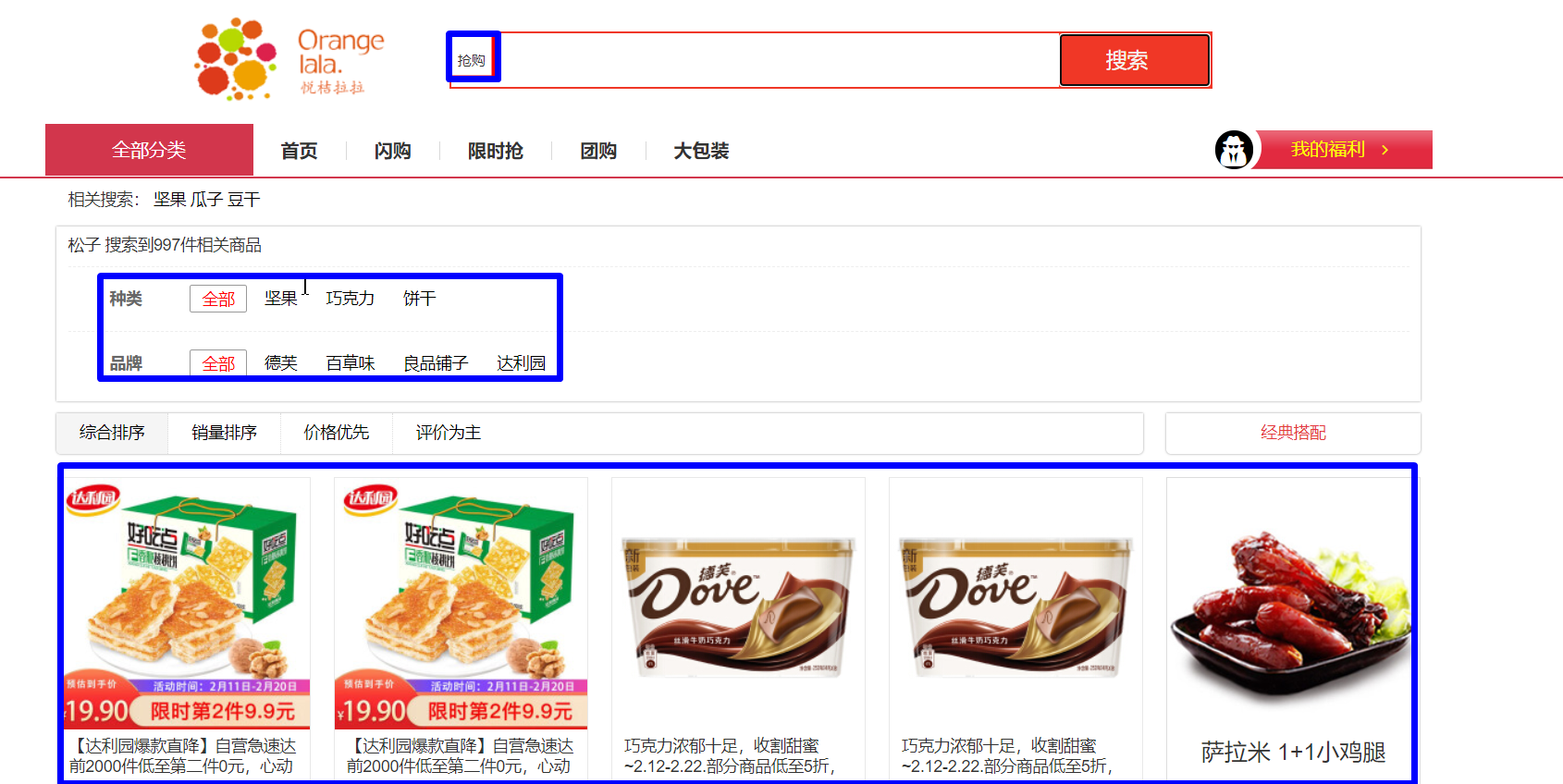
站内搜索的原型效果如下,用户输入关键字即可搜索商品,并支持过滤面板、分页等能力:
2. 域设计
设计索引的域(Field)时,从四个维度考虑:
- 要不要分词?
- 要不要建立索引?
- 要不要存储?
- 使用哪种分词器?
据此设计出的商品索引实体:
package com.portal.entity;

import lombok.Data;
import org.springframework.data.annotation.Id;
import org.springframework.data.elasticsearch.annotations.DateFormat;
import org.springframework.data.elasticsearch.annotations.Document;
import org.springframework.data.elasticsearch.annotations.Field;
import org.springframework.data.elasticsearch.annotations.FieldType;

import java.util.Date;

@Data
@Document(indexName = "es-goods", shards = 1, replicas = 0)
public class ESGoods {

    @Id
    private Long spuId;        // spuId

    @Field(type = FieldType.Text, analyzer = "ik_max_word", store = true)
    private String goodsName;  // 商品名称,Text 类型,需要分词参与检索

    @Field(type = FieldType.Long, index = true, store = true)
    private Long brandId;      // 品牌 id

    @Field(type = FieldType.Keyword, index = true, store = true)
    private String brandName;  // 品牌名称,不分词,用于过滤与分桶

    @Field(type = FieldType.Long, index = true, store = true)
    private Long cid1id;       // 1 级分类 id

    @Field(type = FieldType.Keyword, index = true, store = true)
    private String cat1name;   // 1 级分类名称

    @Field(type = FieldType.Long, index = true, store = true)
    private Long cid2id;       // 2 级分类 id

    @Field(type = FieldType.Keyword, index = true, store = true)
    private String cat2name;   // 2 级分类名称

    @Field(type = FieldType.Long, index = true, store = true)
    private Long cid3id;       // 3 级分类 id

    @Field(type = FieldType.Keyword, index = true, store = true)
    private String cat3name;   // 3 级分类名称

    @Field(type = FieldType.Date, index = true, store = true, format = DateFormat.date_time)
    private Date createTime;   // 创建时间

    @Field(type = FieldType.Double, index = true, store = true)
    private Double price;      // 价格,spu 默认取 sku 的 price

    @Field(type = FieldType.Keyword, index = false, store = true)
    private String imageUrl;   // 图片地址,只存储不参与检索
}
3. 索引库数据初始化
3.1 spu 信息接口开发(商品微服务提供)
List<WxbGoods> findGoodsSpuInfo();Mapper XML:查询审核通过的商品 spu,并关联查出品牌与三级分类:
<?xml version="1.0" encoding="UTF-8"?>
<!DOCTYPE mapper PUBLIC "-//mybatis.org//DTD Mapper 3.0//EN" "http://mybatis.org/dtd/mybatis-3-mapper.dtd">
<mapper namespace="com.portal.goods.mapper.MallGoodsMapper">

    <!-- List<WxbGoods> findGoodsSpuInfo(); -->

    <resultMap id="findGoodsSpuInfoMap" type="MallGoods">
        <result property="spuId" column="spuId"/>
        <result property="goodsName" column="goods_name"/>
        <result property="price" column="default_price"/>
        <result property="typeTemplateId" column="template_id"/>
        <result property="albumPics" column="album_pics"/>
        <!-- 品牌 -->
        <association property="brand" javaType="MallGoodsBrand">
            <id property="id" column="brand_id"/>
            <result property="name" column="brand_name"/>
        </association>
        <!-- 一级分类 -->
        <association property="cat1" javaType="MallGoodsCat">
            <id property="id" column="cat1id"/>
            <result property="name" column="cat1name"/>
        </association>
        <!-- 二级分类 -->
        <association property="cat2" javaType="MallGoodsCat">
            <id property="id" column="cat2id"/>
            <result property="name" column="cat2name"/>
        </association>
        <!-- 三级分类 -->
        <association property="cat3" javaType="MallGoodsCat">
            <id property="id" column="cat3id"/>
            <result property="name" column="cat3name"/>
        </association>
    </resultMap>

    <select id="findGoodsSpuInfo" resultMap="findGoodsSpuInfoMap">
        SELECT
        goods.spu_id as spuId,
        goods.goods_name,
        goods.price as default_price,
        goods.album_pics,
        brand.id as brand_id,
        brand.`name` as brand_name,
        cat1.id as cat1id,
        cat1.`name` as cat1name,
        cat2.id as cat2id,
        cat2.`name` as cat2name,
        cat3.id as cat3id,
        cat3.`name` as cat3name,
        cat3.template_id
        from mall_goods goods
        LEFT JOIN mall_goods_brand brand on brand.id = goods.brand_id
        LEFT JOIN mall_goods_cat cat1 on cat1.id = goods.category1_id
        LEFT JOIN mall_goods_cat cat2 on cat2.id = goods.category2_id
        LEFT JOIN mall_goods_cat cat3 on cat3.id = goods.category3_id
        where goods.audit_status = 1
    </select>

</mapper>
service、controller 代码【略】。
3.2 搜索微服务搭建
搜索微服务基于 spring-data-elasticsearch 搭建,注册到 Nacos,通过 Feign 调用商品微服务获取商品数据(依赖与配置同 01 篇的通用配置,此处略)。
3.3 初始化索引库数据
冷启动同步:先删除并重建索引库,再查商品数据、组装成 ESGoods 批量保存:
@Override
public ResultVO goods2es() {
    // 删除索引库
    template.deleteIndex(ESGoods.class);

    // 创建索引库
    template.createIndex(ESGoods.class);
    template.putMapping(ESGoods.class);

    // 获取商品信息
    List<MallGoods> goodsAudited = goodsApi.findGoodsAudited();
    if (goodsAudited == null) {
        return new ResultVO(false, "同步失败");
    }

    List<ESGoods> list = goodsAudited.stream().map(spu -> {
        // spu -> esGoods
        ESGoods esGoods = new ESGoods();
        esGoods.setSpuId(spu.getSpuId());

        esGoods.setBrandId(spu.getBrand().getId());
        esGoods.setBrandName(spu.getBrand().getName());

        esGoods.setCid1id(spu.getCat1().getId());
        esGoods.setCat1name(spu.getCat1().getName());
        esGoods.setCid2id(spu.getCat2().getId());
        esGoods.setCat2name(spu.getCat2().getName());
        esGoods.setCid3id(spu.getCat3().getId());
        esGoods.setCat3name(spu.getCat3().getName());

        esGoods.setCreateTime(new Date());
        esGoods.setGoodsName(spu.getGoodsName());
        esGoods.setPrice(spu.getPrice().doubleValue());

        if (spu.getAlbumPics() != null) {
            String[] imgArr = spu.getAlbumPics().split(",");
            if (imgArr.length > 0) {
                esGoods.setImageUrl(imgArr[0]);
            }
        }

        return esGoods;
    }).collect(Collectors.toList());

    template.save(list);

    return new ResultVO(true, "同步成功");
}
4. 商品搜索功能拆解
关键字搜索的需求:
- 需求:关键字匹配商品名称、品牌名称、第三级分类名称;
- 实现:使用 bool 查询【
should】,三个字段任一匹配即命中。
5. 关键字搜索接口开发
@Override
public PageResult<ESGoods> search(Map<String, Object> searchMap) {
    // 1. 构建查询条件
    BoolQueryBuilder boolQueryBuilder = QueryBuilders.boolQuery();

    // match[goodsName]
    MatchQueryBuilder goodsNameQueryBuilder = QueryBuilders
        .matchQuery("goodsName", searchMap.get("keyword"));

    // match[brandName]
    MatchQueryBuilder brandNameQueryBuilder = QueryBuilders
        .matchQuery("brandName", searchMap.get("keyword"));

    // match[cat3name]
    MatchQueryBuilder cat3nameQueryBuilder = QueryBuilders
        .matchQuery("cat3name", searchMap.get("keyword"));

    // should:三个字段任一匹配即命中
    boolQueryBuilder.should(goodsNameQueryBuilder);
    boolQueryBuilder.should(brandNameQueryBuilder);
    boolQueryBuilder.should(cat3nameQueryBuilder);

    PageRequest page = null;
    // 2. 设置分页
    if (!StringUtils.isEmpty(searchMap.get("page")) && !StringUtils.isEmpty(searchMap.get("size"))) {
        Integer pageNow = (Integer) searchMap.get("page");
        Integer size = (Integer) searchMap.get("size");

        page = PageRequest.of(pageNow - 1, size);
    }

    // 3. 设置高亮域
    HighlightBuilder goodsNameHighLight = getHighlightBuilder("goodsName");

    NativeSearchQuery build = new NativeSearchQueryBuilder()
        .withQuery(boolQueryBuilder)
        .withPageable(page)
        .withHighlightBuilder(goodsNameHighLight)
        .build();

    SearchHits<ESGoods> result = template.search(build, ESGoods.class);

    // 总记录数
    long totalHits = result.getTotalHits();
    // 取当前页数据
    List<SearchHit<ESGoods>> searchHits = result.getSearchHits();
    List<ESGoods> esGoodsList = new ArrayList<>();
    searchHits.forEach(hit -> {
        // 取文档信息
        ESGoods content = hit.getContent();

        // 取高亮,覆盖商品名称
        Map<String, List<String>> highlightFields = hit.getHighlightFields();
        Set<String> keySet = highlightFields.keySet();
        keySet.forEach(key -> {
            List<String> list = highlightFields.get(key);
            if ("goodsName".equals(key)) {
                String highlightValue = list.get(0);
                content.setGoodsName(highlightValue);
            }
        });
        esGoodsList.add(content);
    });

    // 组装分页结果
    PageResult<ESGoods> pageResult = new PageResult<>();
    pageResult.setTotal(totalHits);
    pageResult.setData(esGoodsList);

    return pageResult;
}

/**
 * 设置高亮字段
 */
private HighlightBuilder getHighlightBuilder(String... fields) {
    // 高亮条件
    HighlightBuilder highlightBuilder = new HighlightBuilder(); // 生成高亮查询器
    for (String field : fields) {
        highlightBuilder.field(field); // 高亮查询字段
    }
    highlightBuilder.requireFieldMatch(false); // 如果要多个字段高亮,这项要为 false
    highlightBuilder.preTags("<span style=\"color:red\">"); // 高亮前置标签
    highlightBuilder.postTags("</span>"); // 高亮后置标签
    // 如果要高亮文字内容等很长的字段,必须配置下面两项,否则会导致高亮不全、文章内容缺失
    highlightBuilder.fragmentSize(800000); // 最大高亮分片大小
    highlightBuilder.numOfFragments(0); // 从第一个分片获取高亮片段

    return highlightBuilder;
}
6. 前端联调
前端页面在 created 生命周期发起首次搜索,搜索条件 searchMap 中的分页参数变化时重新调用:
<script>
var vm = new Vue({
    el: "#app",
    data: {
        searchMap: {
            page: 1,
            size: 3
        },
        goodsList: [],
        total: 0,
        pages: 0
    },
    methods: {
        search() {
            wfx.http.post("/search", this.searchMap).then(res => {
                console.log(res);
                this.goodsList = res.data;
                this.total = res.total;
                this.pages = wfx.pageTotal(this.total, this.searchMap.size);
            })
        }
    },
    created() {
        this.search();
    }
})
</script>
提示
整条搜索链路可以概括为:冷启动同步 + 审核后增量同步保证 ES 数据与数据库一致;搜索接口用 should 复合查询做多字段匹配,分页用 PageRequest,高亮用 HighlightBuilder 回填;前端只负责传关键字与分页参数、渲染结果。