
Vue进阶
Vue进阶
本篇整理 Vue 进阶内容:Axios 发送 ajax 请求、基于 SpringBoot + Vue 的 CRUD 案例(含跨域处理)、组件的定义与使用、Vue Router 路由,以及使用 Vue CLI 脚手架搭建前端工程。
1. Axios
axios(音标:[æk'si:əʊ])是独立于 Vue 的一个项目,基于 promise,用于浏览器和 node.js 的 http 客户端。作用如下:
- 在浏览器中可以帮助我们完成 ajax 请求的发送;
- 在 node.js 中可以向远程接口发送请求。
创建 stu.json,假设这是从服务端获取的数据:
[
  {
    "id": 1,
    "name": "zs",
    "age": 20,
    "addr": "qd"
  }, {
    "id": 2,
    "name": "ls",
    "age": 21,
    "addr": "qd"
  }
]
页面:
<!DOCTYPE html>
<html>
<head>
    <meta charset="utf-8" />
    <title>axios</title>
</head>
<body>
<div id="app">
    <table>
        <tr>
            <td>id</td>
            <td>name</td>
            <td>age</td>
            <td>addr</td>
        </tr>
        <tr v-for="(stu, index) in stuList">
            <td>{{stu.id}}</td>
            <td>{{stu.name}}</td>
            <td>{{stu.age}}</td>
            <td>{{stu.addr}}</td>
        </tr>
    </table>
</div>

<script src="./js/vue.js"></script>
<script src="./js/axios.min.js"></script>
<script>
    new Vue({
        el: "#app", // 表示要操作的元素
        data: { // 数据
            stuList: []
        },
        mounted: function() {
            axios.get('./json/stu.json') // 发送get请求
                .then(resp => { // 正常情况下运行
                    // resp代表从后台获取的数据,除了我们想要的数据,还包括一些额外信息
                    console.log(resp.data)
                    this.stuList = resp.data
                })
                .catch(error => { // 出现错误运行

                })
        }
    })
</script>
</body>
</html>
2. 案例
2.1 目的
我们现在已经学习了 SpringBoot + Vue 的大部分知识,现在通过案例整合之前学习的知识。
使用的技术:
- SpringBoot
- MyBatis-Plus
- MyBatis-Plus 代码生成插件
- Swagger2
- Vue
- Axios
- BootStrap
目的:完成一个基于 SpringBoot + Vue 的 CRUD 案例。
2.2 服务端代码
2.2.1 建库建表
数据库中只有一个 tb_user 表:
CREATE DATABASE `springboot_vue_demo`;

USE `springboot_vue_demo`;

CREATE TABLE `tb_user`  (
  `id` int(11) NOT NULL AUTO_INCREMENT,
  `name` varchar(20) CHARACTER SET utf8 COLLATE utf8_general_ci NULL DEFAULT NULL,
  `age` int(11) NULL DEFAULT NULL,
  `gender` varchar(10) CHARACTER SET utf8 COLLATE utf8_general_ci NULL DEFAULT NULL,
  PRIMARY KEY (`id`) USING BTREE
) ENGINE = InnoDB AUTO_INCREMENT = 55 CHARACTER SET = utf8 COLLATE = utf8_general_ci ROW_FORMAT = Dynamic;

INSERT INTO `tb_user` VALUES (1, 'Robin', 11, 'male');
INSERT INTO `tb_user` VALUES (2, 'Perter', 10, 'male');
INSERT INTO `tb_user` VALUES (3, 'Rose', 10, 'female');
2.2.2 创建项目
创建一个 SpringBoot 项目,用来进行服务端开发。pom 文件如下:
<?xml version="1.0" encoding="UTF-8"?>
<project xmlns="http://maven.apache.org/POM/4.0.0" xmlns:xsi="http://www.w3.org/2001/XMLSchema-instance"
         xsi:schemaLocation="http://maven.apache.org/POM/4.0.0 https://maven.apache.org/xsd/maven-4.0.0.xsd">
    <modelVersion>4.0.0</modelVersion>
    <parent>
        <groupId>org.springframework.boot</groupId>
        <artifactId>spring-boot-starter-parent</artifactId>
        <version>2.4.13</version>
        <relativePath/> <!-- lookup parent from repository -->
    </parent>
    <groupId>com.qfedu</groupId>
    <artifactId>springboot_vue_crud</artifactId>
    <version>1.0.0</version>
    <name>springboot_vue_crud</name>
    <description>Demo project for Spring Boot</description>
    <properties>
        <java.version>1.8</java.version>
    </properties>
    <dependencies>
        <dependency>
            <groupId>org.springframework.boot</groupId>
            <artifactId>spring-boot-starter-web</artifactId>
        </dependency>
        <dependency>
            <groupId>com.baomidou</groupId>
            <artifactId>mybatis-plus-boot-starter</artifactId>
            <version>3.5.1</version>
        </dependency>
        <dependency>
            <groupId>mysql</groupId>
            <artifactId>mysql-connector-java</artifactId>
            <version>5.1.49</version>
            <scope>runtime</scope>
        </dependency>
        <dependency>
            <groupId>org.projectlombok</groupId>
            <artifactId>lombok</artifactId>
            <optional>true</optional>
        </dependency>
        <dependency>
            <groupId>org.springframework.boot</groupId>
            <artifactId>spring-boot-starter-test</artifactId>
            <scope>test</scope>
        </dependency>
        <!-- swagger2相关 -->
        <dependency>
            <groupId>io.springfox</groupId>
            <artifactId>springfox-swagger2</artifactId>
            <version>2.9.2</version>
        </dependency>
        <dependency>
            <groupId>io.springfox</groupId>
            <artifactId>springfox-swagger-ui</artifactId>
            <version>2.9.2</version>
        </dependency>
    </dependencies>

    <build>
        <plugins>
            <plugin>
                <groupId>org.springframework.boot</groupId>
                <artifactId>spring-boot-maven-plugin</artifactId>
                <configuration>
                    <excludes>
                        <exclude>
                            <groupId>org.projectlombok</groupId>
                            <artifactId>lombok</artifactId>
                        </exclude>
                    </excludes>
                </configuration>
            </plugin>
        </plugins>
    </build>
</project>
注
这里没有使用 Druid 连接池,使用的是 SpringBoot 自带的连接池。
2.2.3 配置 MyBatisX 插件生成代码
安装 MyBatisX 插件,连接数据库,生成代码。
2.2.4 配置 Swagger2
package com.qfedu.config;

import org.springframework.context.annotation.Bean;
import org.springframework.context.annotation.Configuration;
import org.springframework.core.env.Environment;
import springfox.documentation.builders.RequestHandlerSelectors;
import springfox.documentation.service.ApiInfo;
import springfox.documentation.service.Contact;
import springfox.documentation.spi.DocumentationType;
import springfox.documentation.spring.web.plugins.Docket;
import springfox.documentation.swagger2.annotations.EnableSwagger2;

import java.util.ArrayList;

@Configuration
@EnableSwagger2
public class Swagger2Config {
    // 配置Swagger2
    @Bean
    public Docket docket(Environment environment) {
        return new Docket(DocumentationType.SWAGGER_2)
                .apiInfo(apiInfo())
                .select()
                .apis(RequestHandlerSelectors.basePackage("com.qfedu.controller"))
                .build();
    }

    // 创建文档信息
    private ApiInfo apiInfo() {
        // 联系方式
        Contact contact = new Contact("Solar",
                "https://note.codeaction.org",
                "solar@126.com");
        // 文档信息
        ApiInfo apiInfo = new ApiInfo("Swagger2测试",
                "学习如何使用Swagger2",
                "10.0.0",
                "https://note.codeaction.org",
                contact,
                "Apache2.0",
                "https://note.codeaction.org", new ArrayList<>());
        return apiInfo;
    }
}
2.2.5 配置 MyBatisPlus
这里主要配置如下内容:
- 包扫描;
- 分页插件。
package com.qfedu.config;

import com.baomidou.mybatisplus.annotation.DbType;
import com.baomidou.mybatisplus.extension.plugins.MybatisPlusInterceptor;
import com.baomidou.mybatisplus.extension.plugins.inner.PaginationInnerInterceptor;
import org.mybatis.spring.annotation.MapperScan;
import org.springframework.context.annotation.Bean;
import org.springframework.context.annotation.Configuration;

@Configuration
@MapperScan("com.qfedu.mapper")
public class MyBatisPlusConfig {
    // 配置分页插件
    @Bean
    public MybatisPlusInterceptor mybatisPlusInterceptor() {
        MybatisPlusInterceptor interceptor = new MybatisPlusInterceptor();
        interceptor.addInnerInterceptor(new PaginationInnerInterceptor(DbType.MYSQL));
        return interceptor;
    }
}
2.2.6 创建统一返回数据的 Bean
package com.qfedu.beans;

public class RespBean {
    // 状态码:200-成功,500-失败
    private Integer status;
    // 提示消息
    private String msg;
    // 返回的数据
    private Object obj;

    public static RespBean build() {
        return new RespBean();
    }

    public static RespBean ok(String msg) {
        return new RespBean(200, msg, null);
    }

    public static RespBean ok(String msg, Object obj) {
        return new RespBean(200, msg, obj);
    }

    public static RespBean error(String msg) {
        return new RespBean(500, msg, null);
    }

    public static RespBean error(String msg, Object obj) {
        return new RespBean(500, msg, obj);
    }

    private RespBean() {
    }

    private RespBean(Integer status, String msg, Object obj) {
        this.status = status;
        this.msg = msg;
        this.obj = obj;
    }

    public Integer getStatus() {
        return status;
    }

    public RespBean setStatus(Integer status) {
        this.status = status;
        return this;
    }

    public String getMsg() {
        return msg;
    }

    public RespBean setMsg(String msg) {
        this.msg = msg;
        return this;
    }

    public Object getObj() {
        return obj;
    }

    public RespBean setObj(Object obj) {
        this.obj = obj;
        return this;
    }
}
2.2.7 SpringBoot 配置文件
server.port=9999

spring.datasource.driver-class-name=com.mysql.jdbc.Driver
spring.datasource.url=jdbc:mysql://localhost:3306/springboot_vue_demo?useSSL=false
spring.datasource.username=root
spring.datasource.password=root

# mybatis配置
mybatis.type-aliases-package=com.qfedu.bean
#mybatis.mapper-locations=classpath:mapper/*Mapper.xml

# 日志
logging.level.com.qfedu.mapper=DEBUG
2.2.8 Controller 代码
package com.qfedu.controller;

import com.baomidou.mybatisplus.extension.plugins.pagination.Page;
import com.qfedu.beans.RespBean;
import com.qfedu.beans.User;
import com.qfedu.service.UserService;
import org.springframework.beans.factory.annotation.Autowired;
import org.springframework.web.bind.annotation.*;

import java.util.List;

@RestController
@RequestMapping("/user")
public class UserController {
    @Autowired
    private UserService userService;

    // 查询所有
    @GetMapping("/")
    public RespBean findAll() {
        List<User> list = userService.list();
        return RespBean.ok("success", list);
    }

    // 分页查询
    @GetMapping("/list/{currentPage}")
    public RespBean list(@PathVariable("currentPage") Integer currentPage) {
        Page<User> page = new Page<>(currentPage, 2);
        page = userService.page(page);
        return RespBean.ok("success", page);
    }

    // 根据ID查询
    @GetMapping("/{id}")
    public RespBean findById(@PathVariable("id") Integer id) {
        User user = userService.getById(id);
        return RespBean.ok("success", user);
    }

    // 添加
    @PostMapping("/")
    public RespBean add(@RequestBody User user) {
        boolean result = userService.save(user);
        return RespBean.ok("success");
    }

    // 删除
    @DeleteMapping("/{id}")
    public RespBean del(@PathVariable("id") Integer id) {
        boolean result = userService.removeById(id);
        return RespBean.ok("success");
    }

    // 修改
    @PutMapping("/")
    public RespBean chg(@RequestBody User user) {
        userService.updateById(user);
        return RespBean.ok("success");
    }
}
启动项目,访问 http://localhost:9999/swagger-ui.html 对 Controller 中的方法进行测试。
2.3 前端代码
2.3.1 引入相关资源
在页面中引入 vue 和 axios 两个 js 文件。
2.3.2 前后端联调
目的:测试前后端能否互相传递数据。
<script>
    let app = new Vue({
        el: '#main',
        data: {},
        methods: {
            findAll() {
                axios.get("http://localhost:9999/user/")
                    .then(resp => {
                        console.log(resp);
                    })
            }
        },
        created() {
            this.findAll()
        }
    })
</script>
这里使用的 findAll 函数和 Controller 中的 findAll 方法是用来测试的,前后端能够正常交互后,这两部分代码就没有价值了。
此时我们看控制台,提示如下:
Access to XMLHttpRequest at 'xxxxxxxxxxxxxxxxxx' from origin 'xxxxxxxxxxx' has been blocked by CORS policy: No 'Access-Control-Allow-Origin' header is present on the requested测试说明产生了跨域问题,关于跨域详见本篇 2.4 跨域。
2.3.3 分页查询
在 data 中增加如下内容:
page: {}分页查询方法:
findByPage(currentPage) {
    axios.get("http://localhost:9999/user/list/" + currentPage)
        .then(resp => {
            // 将服务端返回的数据赋值给page
            app.page = resp.data.obj
        })
}

created() {
    this.findByPage(1)
}
页面:
<div class="row">
    <table id="tb1" class="table table-bordered text-center table-hover">
        <thead>
            <tr>
                <!-- <th><input type="checkbox"/></th> -->
                <th>id</th>
                <th>姓名</th>
                <th>年龄</th>
                <th>性别</th>
                <th colspan="2">操作</th>
            </tr>
        </thead>
        <tbody>
            <tr v-for="item in page.records">
                <td>{{item.id}}</td>
                <td>{{item.name}}</td>
                <td>{{item.age}}</td>
                <td>{{item.gender}}</td>
                <td class="opt">
                    <a data-toggle="modal" data-target="#chgModal">
                        <span class="glyphicon glyphicon-edit"></span>
                    </a>
                </td>
                <td class="opt">
                    <a>
                        <span class="glyphicon glyphicon-trash text-warning"></span>
                    </a>
                </td>
            </tr>
        </tbody>
    </table>
</div>

<div class="row text-center">
    <nav>
        <ul class="pagination">
            <li :class="{disabled:page.current == 1}">
                <a href="#" @click="findByPage(1)">首页</a>
            </li>
            <li :class="{disabled:page.current == 1}">
                <!-- 上一页,在当前页码基础上减1 -->
                <a href="#" @click="findByPage(page.current - 1)">上一页</a>
            </li>
            <li :class="{disabled:page.current == page.pages}">
                <!-- 下一页,在当前页码基础上加1 -->
                <a href="#" @click="findByPage(page.current + 1)">下一页</a>
            </li>
            <li :class="{disabled:page.current == page.pages}">
                <!-- 尾页,直接传递总页数 -->
                <a href="#" @click="findByPage(page.pages)">尾页</a>
            </li>
        </ul>
    </nav>
</div>
2.3.4 添加
在 data 中增加如下内容:
userAdd: {
    id: 0,
    name: '',
    age: '',
    gender: ''
}
添加方法:
add() {
    axios.post("http://localhost:9999/user/", app.userAdd)
        .then(resp => {
            app.userAdd = {
                id: 0,
                name: '',
                age: '',
                gender: ''
            }
            if(resp.data.status == 200) {
                $.alert('添加成功');
                $("#addModal").modal('hide');
                app.findByPage(1);
            }
        })
}
页面:
<!-- addModal -->
<div class="modal fade" id="addModal" tabindex="-1" role="dialog" aria-labelledby="myModalLabel">
<div class="modal-dialog" role="document">
<div class="modal-content">
<div class="modal-header">
<button type="button" class="close" data-dismiss="modal" aria-label="Close"><span aria-hidden="true">×</span></button>
<h4 class="modal-title" id="myModalLabel">添加信息</h4>
</div>
<div class="modal-body">
<form class="form-horizontal">
<div class="form-group">
<label class="col-sm-2 control-label">姓名</label>
<div class="col-sm-10">
<input type="text" class="form-control" placeholder="请输入姓名" v-model="userAdd.name" />
</div>
</div>
<div class="form-group">
<label class="col-sm-2 control-label">年龄</label>
<div class="col-sm-10">
<input type="number" class="form-control" placeholder="请输入年龄" v-model="userAdd.age" />
</div>
</div>
<div class="form-group">
<label class="col-sm-2 control-label">性别</label>
<div class="col-sm-10">
<div class="checkbox">
<label>
<input type="radio" name="gender" value="male" v-model="userAdd.gender" /> 男
<input type="radio" name="gender" value="female" v-model="userAdd.gender" /> 女
</label>
</div>
</div>
</div>
</form>
</div>
<div class="modal-footer">
<button type="button" class="btn btn-primary" @click="add()">保存</button>
<button type="button" class="btn btn-default" data-dismiss="modal">关闭</button>
</div>
</div>
</div>
</div>2.3.5 修改
在 data 中增加如下内容:
userUpdate: {
    id: 0,
    name: '',
    age: '',
    gender: ''
}
根据 id 查询、修改方法:
update() {
    axios.put("http://localhost:9999/user/", app.userUpdate)
        .then(resp => {
            if(resp.data.status == 200) {
                app.userUpdate = {
                    id: 0,
                    name: '',
                    age: '',
                    gender: ''
                };
                $("#chgModal").modal('hide');
                $.alert('修改成功');
                app.findByPage(1);
            }
        })
},
findById(id) {
    axios.get("http://localhost:9999/user/" + id)
        .then(resp => {
            app.userUpdate = resp.data.obj;
            $("#chgModal").modal('show');
        })
}
页面:
<!-- chgModal -->
<div class="modal fade" id="chgModal" tabindex="-1" role="dialog" aria-labelledby="myModalLabel">
<div class="modal-dialog" role="document">
<div class="modal-content">
<div class="modal-header">
<button type="button" class="close" data-dismiss="modal" aria-label="Close"><span aria-hidden="true">×</span></button>
<h4 class="modal-title" id="myModalLabel">修改信息</h4>
</div>
<div class="modal-body">
<form class="form-horizontal">
<input type="hidden" v-bind:value="userUpdate.id">
<div class="form-group">
<label class="col-sm-2 control-label">姓名</label>
<div class="col-sm-10">
<input type="text" class="form-control" placeholder="请输入姓名" v-model="userUpdate.name"/>
</div>
</div>
<div class="form-group">
<label class="col-sm-2 control-label">年龄</label>
<div class="col-sm-10">
<input type="number" class="form-control" placeholder="请输入年龄" v-model="userUpdate.age"/>
</div>
</div>
<div class="form-group">
<label class="col-sm-2 control-label">性别</label>
<div class="col-sm-10">
<div class="checkbox">
<label>
<input type="radio" name="gender" value="male" v-model="userUpdate.gender" /> 男
<input type="radio" name="gender" value="female" v-model="userUpdate.gender" /> 女
</label>
</div>
</div>
</div>
</form>
</div>
<div class="modal-footer">
<button type="button" class="btn btn-primary" @click="update()">修改</button>
<button type="button" class="btn btn-default" data-dismiss="modal">关闭</button>
</div>
</div>
</div>
</div>2.3.6 删除
del(id) {
    $.alert({
        title: '删除确认',
        content: '你确实要删除吗?',
        buttons: {
            confirm: {
                text: '确认',
                btnClass: 'btn-primary',
                action: function(){
                    axios.delete("http://localhost:9999/user/" + id)
                        .then(resp => {
                            if(resp.data.status == 200) {
                                $.alert('删除成功');
                                app.findByPage(1);
                            }
                        })
                }
            },
            cancel: {
                text: '取消'
            }
        }
    });
}
2.4 跨域
2.4.1 什么是跨域
跨域:指的是浏览器不能执行其他网站的脚本。它是由浏览器的同源策略造成的,是浏览器对 JavaScript 施加的安全限制。
例如:a 页面想获取 b 页面资源,如果 a、b 页面的协议、域名、端口、子域名不同,所进行的访问行动都是跨域的。而浏览器为了安全问题一般都限制了跨域访问,也就是不允许跨域请求资源。
重要
跨域限制访问,其实是浏览器的限制,理解这一点很重要。同源策略:是指协议、域名、端口都要相同,其中有一个不同就会产生跨域。
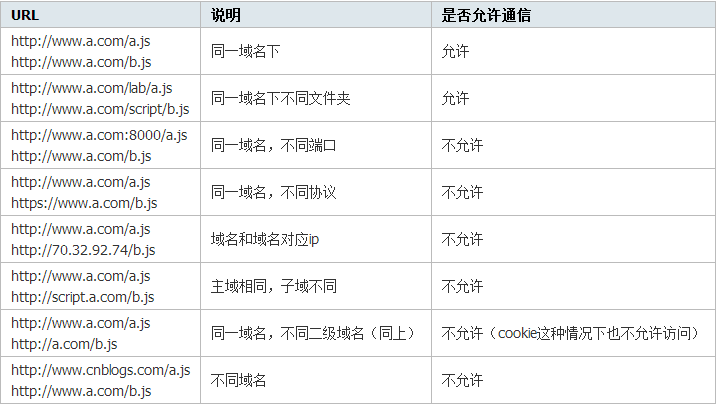
假设有两个网站:A 网站部署在 http://localhost:81(本地 81 端口),B 网站部署在 http://localhost:82(本地 82 端口)。现在 A 网站的页面想去访问 B 网站的信息,就会产生跨域问题,在控制台会输出如下信息:
Access to XMLHttpRequest at 'xxxxxxxxxxxxxxxxxx' from origin 'xxxxxxxxxxx' has been blocked by CORS policy: No 'Access-Control-Allow-Origin' header is present on the requested2.4.2 处理
在 Controller 上添加 @CrossOrigin 注解即可放行跨域请求。
3. 组件
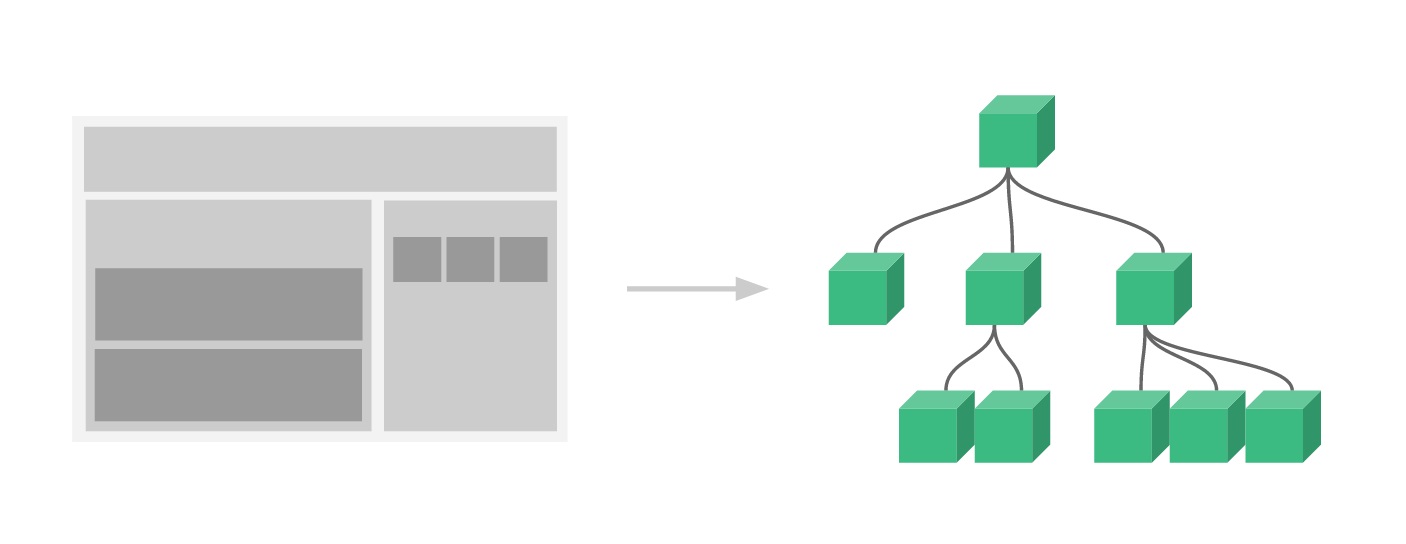
组件(Component)是 Vue.js 最强大的功能之一。
组件可以扩展 HTML 元素,封装可重用的代码。
组件系统让我们可以用独立可复用的小组件来构建大型应用,几乎任意类型的应用的界面都可以抽象为一个组件树:
3.1 局部组件
定义组件:
new Vue({
    el: '#app',
    // 定义局部组件,这里可以定义多个局部组件
    components: {
        // 组件的名字
        'Navbar': {
            // 组件的内容
            template: '<ul><li>首页</li><li>项目管理</li></ul>'
        }
    }
})
使用组件:
<div id="app">
    <Navbar></Navbar>
</div>
3.2 全局组件
定义全局组件 components/Navbar.js:
// 定义全局组件
Vue.component('Navbar', {
    template: '<ul><li>首页</li><li>项目管理</li><li>人员管理</li></ul>'
})
使用全局组件:
<div id="app">
    <Navbar></Navbar>
</div>
<script src="js/vue.min.js"></script>
<script src="components/Navbar.js"></script>
<script>
    var app = new Vue({
        el: '#app'
    })
</script>
4. 路由
Vue.js 路由允许我们通过不同的 URL 访问不同的内容。
通过 Vue.js 可以实现多视图的单页 Web 应用(single page web application,SPA)。
Vue.js 路由需要载入 vue-router 库。
4.1 引入 js
<script src="js/vue.min.js"></script>
<script src="js/vue-router.min.js"></script>
4.2 编写 html
<div id="app">
    <h1>Hello App!</h1>
    <p>
        <!-- 使用 router-link 组件来导航. -->
        <!-- 通过传入 `to` 属性指定链接. -->
        <!-- <router-link> 默认会被渲染成一个 `<a>` 标签 -->
        <router-link to="/">首页</router-link>
        <router-link to="/student">学生管理</router-link>
        <router-link to="/teacher">讲师管理</router-link>
    </p>
    <!-- 路由出口 -->
    <!-- 路由匹配到的组件将渲染在这里 -->
    <router-view></router-view>
</div>
4.3 编写 js
<script>
    // 1. 定义(路由)组件。
    // 可以从其他文件 import 进来
    const Welcome = { template: '<div>欢迎</div>' }
    const Student = { template: '<div>student list</div>' }
    const Teacher = { template: '<div>teacher list</div>' }
    // 2. 定义路由
    // 每个路由应该映射一个组件。
    const routes = [
        { path: '/', redirect: '/welcome' }, // 设置默认指向的路径
        { path: '/welcome', component: Welcome },
        { path: '/student', component: Student },
        { path: '/teacher', component: Teacher }
    ]
    // 3. 创建 router 实例,然后传 `routes` 配置
    const router = new VueRouter({
        routes // (缩写)相当于 routes: routes
    })
    // 4. 创建和挂载根实例。
    // 从而让整个应用都有路由功能
    const app = new Vue({
        el: '#app',
        router
    })
    // 现在,应用已经启动了!
</script>
5. Vue CLI 脚手架
在之前学习 Vue 基础知识点时,我们还是采用传统的方式,通过在 html 页面上引用 vue.js 这个文件,从而将 Vue 引入到我们的项目开发中。伴随着 Node.js 的出现,以及 React、AngularJS、Vue 这类前端 MVVM 框架的发展,前端越来越向后端靠拢,前端工程化的思想开始出现。现在的前端开发,已经不再只是一个 html 页面、上面引用各种 js、css 文件就可以完成开发的了。
与后端类似,前端开始出现各种已经很完善的框架模板、针对前端组件包的管理工具、各种各样的单元测试库,以及针对前端所特有的 js、css、image 静态资源文件的模块打包器。那么,我们就从零开始,结合之前学习的 Vue 相关的基础知识,通过 Vue CLI 和 Ant Design Vue 去搭建一个基于 Vue 的 SPA(single page web application)前端项目框架模板。
5.1 什么是 CLI
命令行界面(英语:command-line interface,缩写:CLI)是在图形用户界面得到普及之前使用最为广泛的用户界面。它通常不支持鼠标,用户通过键盘输入指令,计算机接收到指令后予以执行。也有人称之为字符用户界面(CUI)。
5.2 什么是 Vue CLI
Vue CLI 是一个基于 Vue.js 进行快速开发的完整系统框架,它是一个框架生成脚手架工具,可以帮助我们生成基于 Vue 的前端框架模板。我们可以在这个框架模板上进行开发,从而开发出具有统一标准、规范化的项目。可以将其理解成 Spring 体系下的 SpringBoot。
Ant Design Vue 是基于 Vue.js 所做的一套前端组件库。你可以把它理解成类似于 Bootstrap 或是 EasyUI 这种基于 Vue 中组件的思想所实现的前端 UI 库。通过使用这套组件库,我们就可以更好地统一整个项目的前端样式,并且更加方便地进行开发。当然,你也可以采用别的组件库或是自己手写一套。
5.3 Vue CLI 安装
5.3.1 安装 node.js
node.js 可以认为是前端的 JDK。
- 下载
node.js:- 下载地址:https://nodejs.org/zh-cn/download/
- 版本:v14.15.3
- 安装
node.js:默认情况下会配置环境变量; - 验证
node.js是否安装成功:
node -v5.3.2 npm
npm 是 node package manager 的缩写,即 node.js 的包管理工具,前端相关包使用 npm 进行统一管理:
maven管理 java 后端依赖;npm管理前端系统依赖。
相关设置:
# 配置淘宝镜像
npm config set registry https://registry.npm.taobao.org
# 查看镜像设置
npm config get registry
5.3.3 安装 Vue CLI
当 Node 环境安装好之后,我们就可以安装 Vue CLI 3 脚手架工具了。如果你之前已经全局安装了旧版本的 vue-cli(1.x 或 2.x),则需要先卸载旧版本的 Vue CLI:
npm uninstall vue-cli -g安装 Vue CLI:
npm install -g @vue/cli安装之后,我们就可以在命令行中使用 vue 命令:
# 查看 vue 相关帮助信息
vue
# 查看安装的 vue cli 版本信息
vue --version
5.4 使用 Vue CLI 创建项目
当我们安装完成后,就可以通过命令行去创建一个前端项目模板。首先,进入你需要创建项目的路径下,打开终端,然后使用下面的命令来创建项目。因为某些原因,连接 npm 源的速度可能会比较慢,所以在创建项目时,Vue CLI 会提示我们是否将淘宝的镜像源添加到 npm 中,从而加快访问速度,你可以自由选择。
vue create 项目名称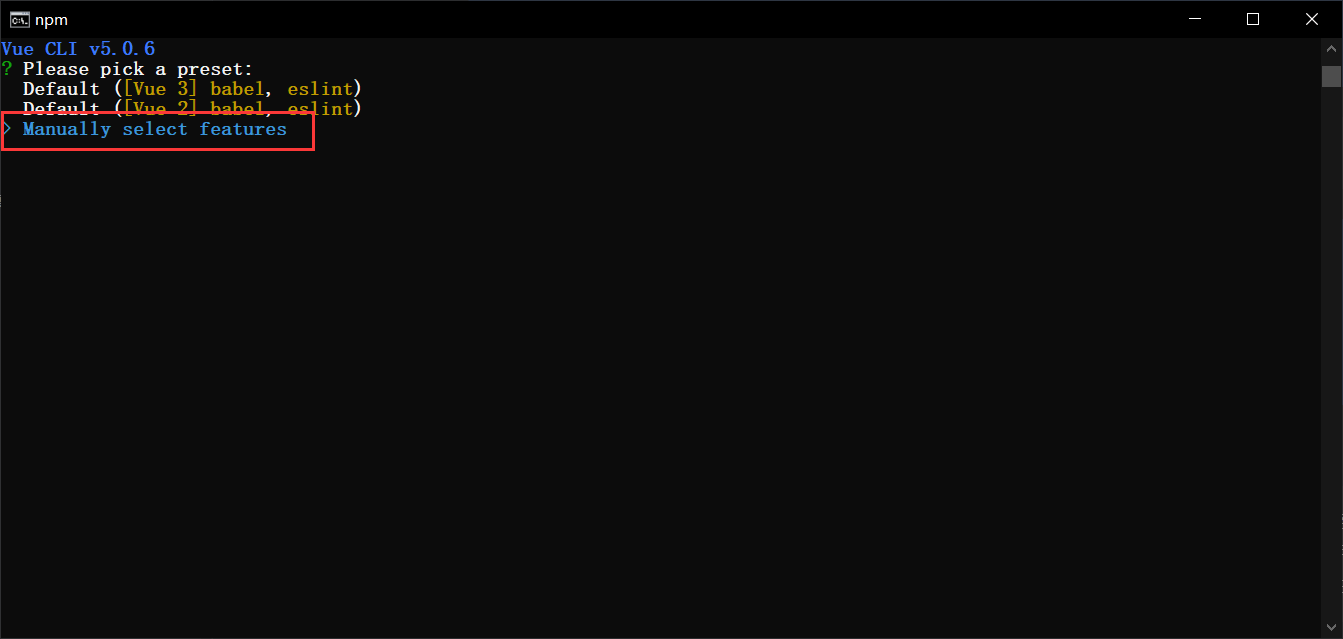
此时,从控制台中可以看到给出了三个选项:第一、二项为系统预设的项目模板配置,而第三项则是我们可以自己选择项目模板需要加载什么前端组件。这里我们选择第三项,自己来决定加载什么组件。
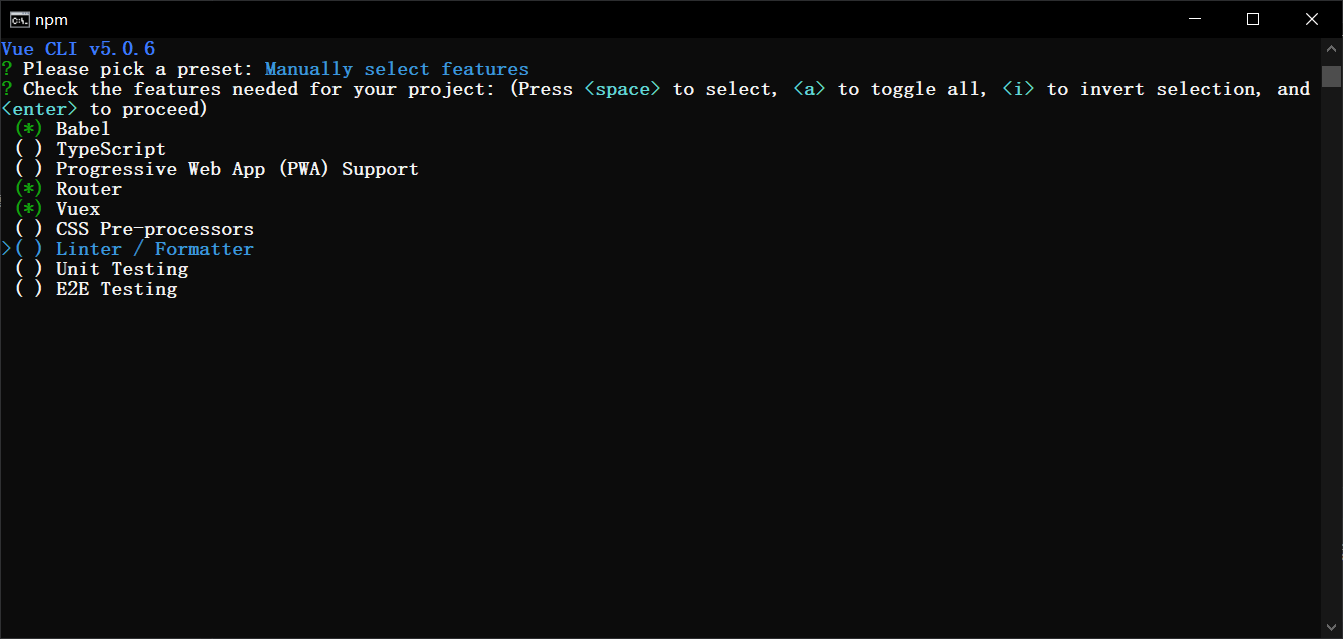
在选择前端组件时,我们可以通过上下方向键进行切换,通过空格键进行选择,当决定好项目加载的组件后,可以通过 Enter 键来进行确定。每个组件的基本功能介绍如下:
| 组件 | 功能说明 |
|---|---|
Babel | JavaScript 转码器。使用新的语法时,旧版本浏览器可能无法支持,通过 Babel 可以自动将新版本的语法糖转换成传统的 JavaScript 语法 |
TypeScript | 提供 JavaScript 不支持的强语言特性,如类、接口、参数类型约束等,最终还是会编译成 js 文件让浏览器识别 |
PWA | 渐进式 Web 应用,利用标准化框架在网页应用中实现和原生应用相近的用户体验 |
Router | Vue 官方的路由管理组件 |
Vuex | Vue.js 的状态管理模式。多个组件之间需要共享相同的数据时,需要一个集中式的状态管理器来更好地管理数据 |
CSS Pre-processors | CSS 预处理器,可以让我们以一种编程的方式来写 CSS,最终编译成标准 css 文件 |
Linter / Formatter | 代码格式检查和格式化工具,让项目代码保持统一的风格 |
Unit Testing / E2E Testing | 单元测试工具 |
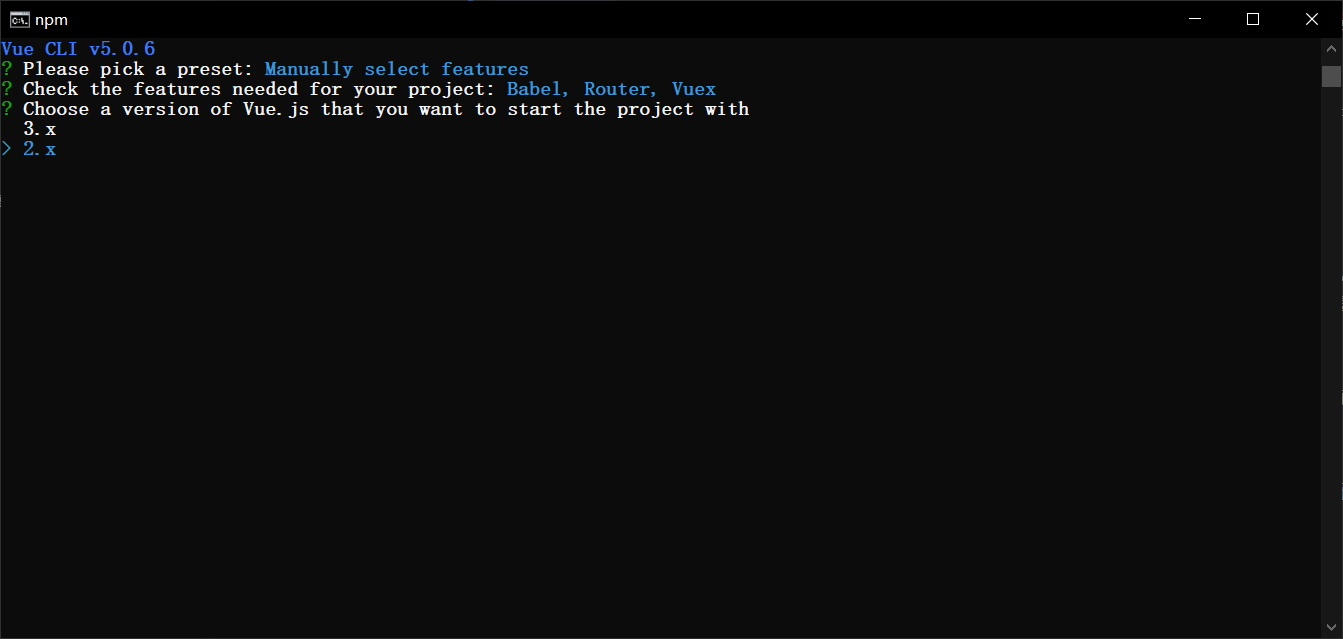
选中 Vue 版本,这里选中 2.x,我们之前就是基于 2.6 学习的:
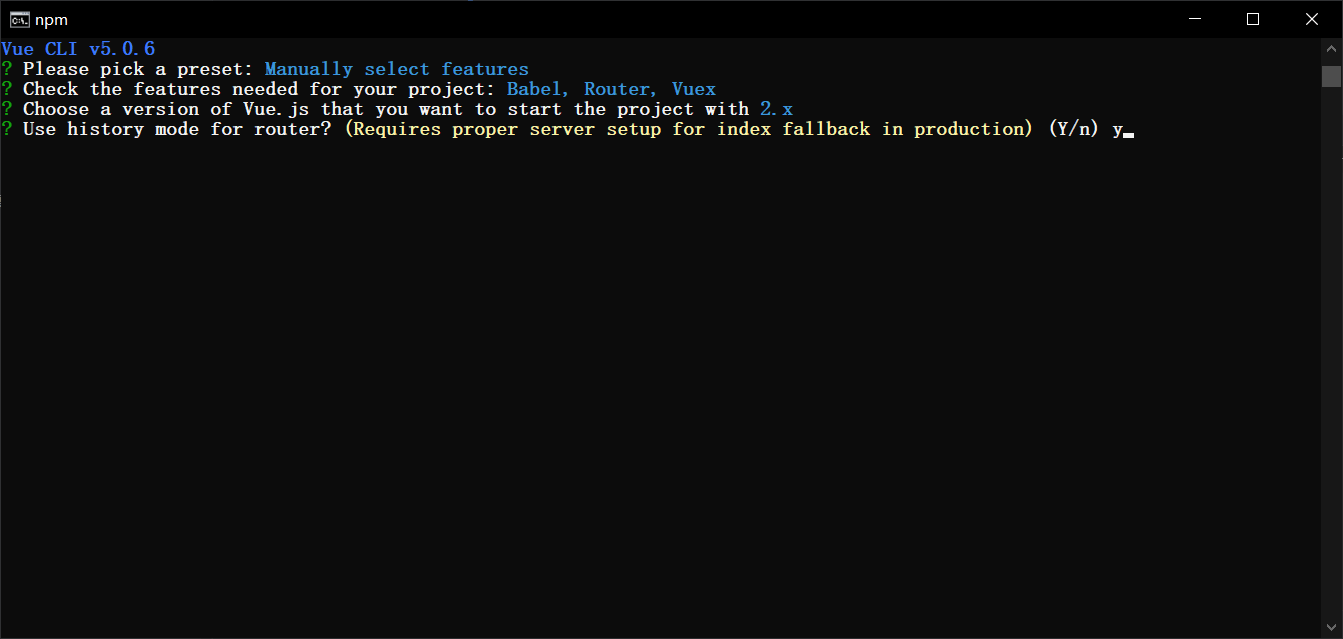
这里我们继续使用 history 路由模式:
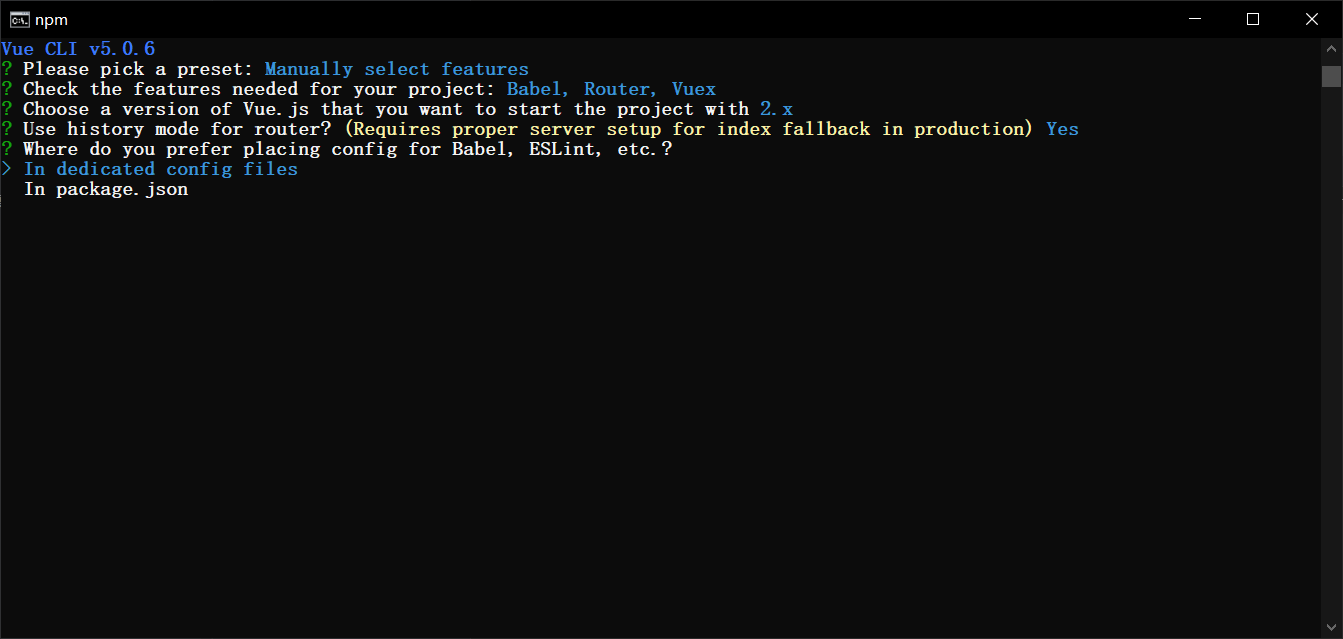
加载的这些组件,需要一个配置文件进行配置。你可以选择全部放到 package.json 中,也可以选择将每个组件的配置单独放到一个配置文件中,这里我选择一个组件一个配置文件:
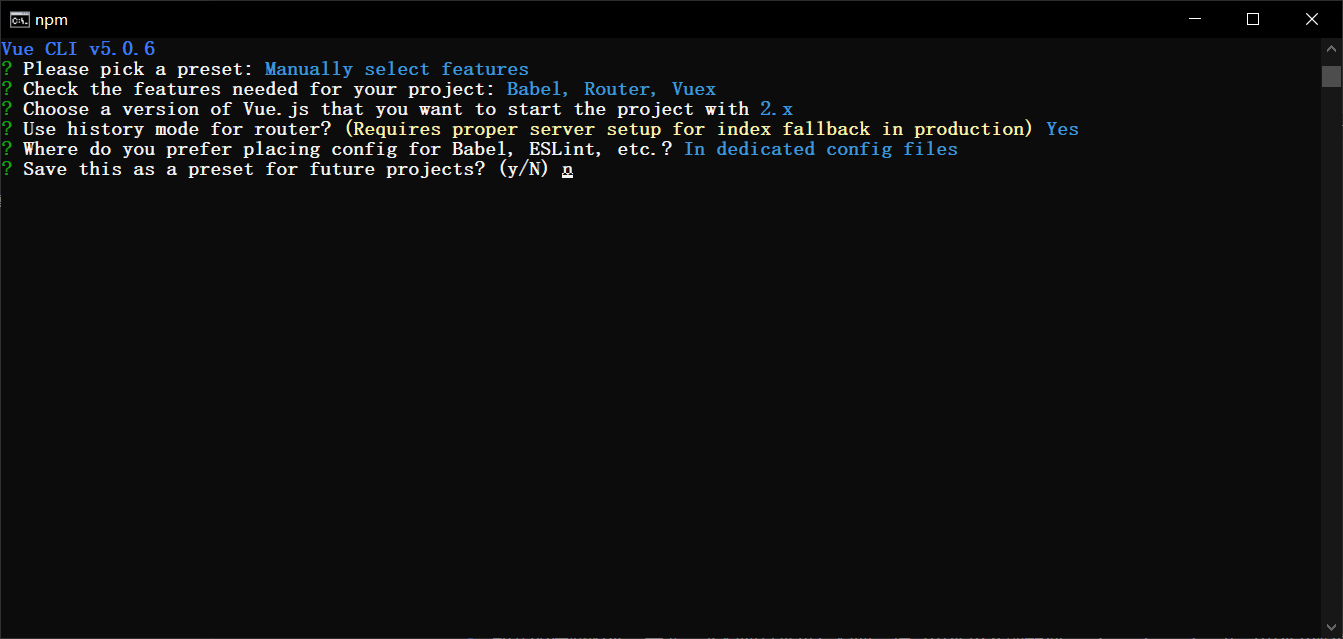
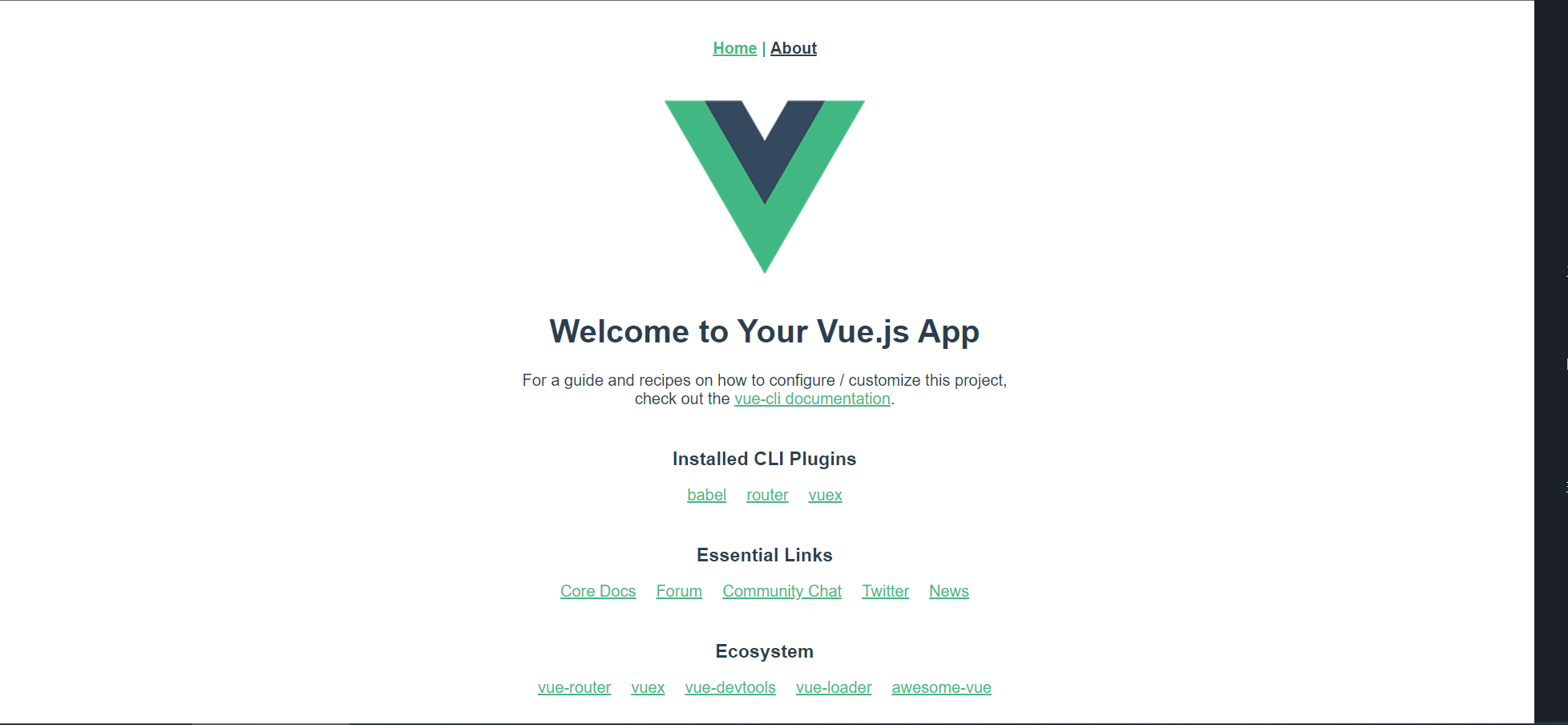
最后一步,是否保存这次的设置,如果保存的话,下次创建项目时就可以直接使用了,这里我没有保存。然后,慢慢等待项目依赖的组件加载完成。当所有的依赖加载完成后,系统提示我们进入到项目路径,然后执行 npm run serve 命令。当我们执行命令后,可以看到项目已经运行起来了,打开浏览器查看,当出现下面的页面时,项目的基础模板已经搭建完成。
5.5 使用 WebStorm 打开生成的项目
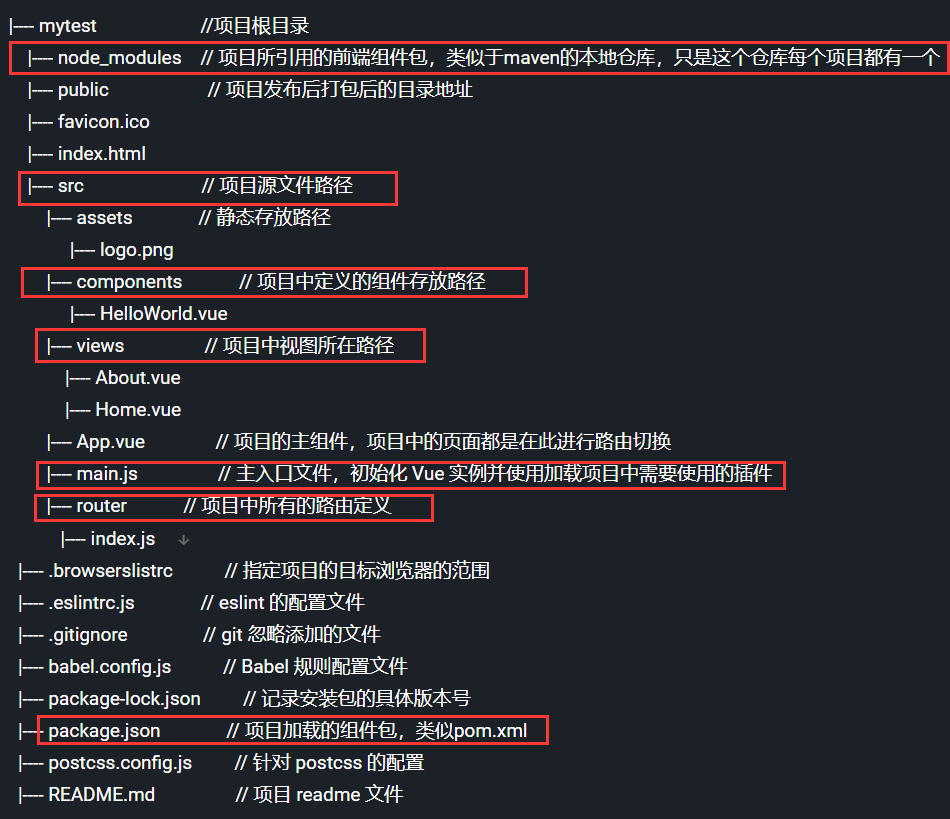
项目中生成了很多文件和目录,下面对其进行说明:
5.5.1 引入 Ant Design Vue
修改 package.json,在 dependencies 第一行添加 "ant-design-vue": "^1.7.8",,然后执行下面的命令:
npm install在 main.js 中添加如下的代码:
import Antd from 'ant-design-vue';
import 'ant-design-vue/dist/antd.css';

Vue.use(Antd);
5.5.2 引入 Axios
在项目根目录运行下面的命令,安装 Axios:
npm install axios在 main.js 中添加如下的代码:
import axios from 'axios'
Vue.prototype.$axios = axios
之后就可以在组件中通过 this.$axios 发送请求,例如分页查询:
findByPage(pageNum) {
    this.$axios.get("http://localhost:9999/user/list/" + pageNum)
        .then(resp => {
            console.log(resp);
        })
}
6. 本章小结
- Axios 是基于 promise 的 http 客户端,通常在
mounted/created钩子中发送请求获取数据并渲染; - SpringBoot + Vue 的 CRUD 案例串联了 MyBatis-Plus、Swagger2、统一返回 Bean(RespBean)与前端增删改查弹窗的完整链路;
- 浏览器的同源策略(协议、域名、端口必须一致)导致跨域请求被拦截,服务端加
@CrossOrigin即可解决; - 组件分为局部组件(
components选项)与全局组件(Vue.component),是复用 UI 的基本单元; - Vue Router 通过
router-link导航、router-view渲染匹配组件,实现单页应用的多视图切换; - Vue CLI + Node.js/npm 是前端工程化的标准工具链,可类比后端的 JDK + Maven + SpringBoot。