
SpringBoot进阶
SpringBoot进阶
本篇整理 SpringBoot 整合 JSP、基于 SpringBoot 的 SSM 整合、Thymeleaf 模板引擎的语法与碎片用法,以及 SpringBoot 应用的热部署配置。
1. SpringBoot 整合 JSP(了解)
SpringBoot 应用默认支持的动态网页技术是 Thymeleaf,并不支持 JSP,因此在 SpringBoot 应用中想要使用 JSP,需要通过手动整合来实现。
1.1 添加依赖
<dependency>
    <groupId>org.apache.tomcat.embed</groupId>
    <artifactId>tomcat-embed-jasper</artifactId>
    <version>9.0.45</version>
</dependency>
<dependency>
    <groupId>javax.servlet</groupId>
    <artifactId>jstl</artifactId>
    <version>1.2</version>
</dependency>
其中 tomcat-embed-jasper 用于解析编译 JSP,jstl 提供 JSP 页面中常用的标签库支持。
1.2 创建 JSP 页面
- 修改 pom 文件的打包方式为
war(因为 JSP 必须运行在 Servlet 容器中); - 在
src/main下新建webapp目录; - 在 webapp 中创建
.jsp页面。
1.3 将 JSP 页面放在 WEB-INF 中访问
将 JSP 文件存放到 webapp 目录,并在 application.yml 文件中配置 SpringMVC 的视图解析方式:
spring:
  mvc:
    view:
      prefix: /
      suffix: .jsp
创建 TestController:
@Controller
public class TestController {

    @RequestMapping("/test")
    public String test() {
        return "test";
    }
}
注
如果使用静态资源,静态资源需要放在 resources/static 目录下。
2. 基于 SpringBoot 的 SSM 整合(重点)
2.1 创建 SpringBoot 项目
创建项目时添加以下依赖:
- lombok
- spring web
- mysql driver
- mybatis framework
- PageHelper
如果默认的 mysql 驱动版本与数据库不匹配,可以手动修改 mysql 驱动的版本(可选):
<dependencies>
    <dependency>
        <groupId>org.springframework.boot</groupId>
        <artifactId>spring-boot-starter-web</artifactId>
    </dependency>
    <dependency>
        <groupId>org.projectlombok</groupId>
        <artifactId>lombok</artifactId>
        <optional>true</optional>
    </dependency>
    <dependency>
        <groupId>org.springframework.boot</groupId>
        <artifactId>spring-boot-starter-test</artifactId>
        <scope>test</scope>
    </dependency>
    <dependency>
        <groupId>org.apache.tomcat.embed</groupId>
        <artifactId>tomcat-embed-jasper</artifactId>
        <version>9.0.45</version>
    </dependency>
    <dependency>
        <groupId>javax.servlet</groupId>
        <artifactId>jstl</artifactId>
        <version>1.2</version>
    </dependency>
    <dependency>
        <groupId>mysql</groupId>
        <artifactId>mysql-connector-java</artifactId>
        <version>5.1.49</version>
        <scope>runtime</scope>
    </dependency>
    <dependency>
        <groupId>com.alibaba</groupId>
        <artifactId>druid-spring-boot-starter</artifactId>
        <version>1.2.8</version>
    </dependency>
    <dependency>
        <groupId>org.mybatis.spring.boot</groupId>
        <artifactId>mybatis-spring-boot-starter</artifactId>
        <version>2.2.2</version>
    </dependency>
    <dependency>
        <groupId>com.github.pagehelper</groupId>
        <artifactId>pagehelper-spring-boot-starter</artifactId>
        <version>1.4.1</version>
    </dependency>
</dependencies>
2.2 整合 MyBatis 所需的配置
完成 MyBatis 的自定义配置(application.properties):
server.port=8099
server.servlet.context-path=/test

# 配置前缀后缀
spring.mvc.view.prefix=/
spring.mvc.view.suffix=.jsp

# 配置连接池
spring.datasource.driver-class-name=com.mysql.jdbc.Driver
spring.datasource.url=jdbc:mysql://localhost:3306/ssm_demo?useSSL=false
spring.datasource.username=root
spring.datasource.password=root

# mybatis配置
mybatis.type-aliases-package=com.qfedu.bean
# mybatis.mapper-locations=classpath:mapper/*Mapper.xml

# 日志
logging.level.com.qfedu.mapper=DEBUG
提示
logging.level.com.qfedu.mapper=DEBUG 会让 mapper 包下的 SQL 语句打印到控制台,调试时非常有用。
2.3 创建实体类
Student.java:
@Data
public class Student {
    private Long id;
    private String name;
    private String gender;
    private Integer age;
    private String addr;
}
2.4 创建 Mapper 接口及映射配置文件
StudentMapper.java:
package com.qfedu.mapper;

import com.qfedu.bean.Student;

import java.util.List;

public interface StudentMapper {
    // 添加
    int add(Student student);
    // 根据 ID 删除
    int del(Long id);
    // 修改
    int update(Student student);
    // 查询所有
    List<Student> findAll();
    // 根据 ID 查询
    Student findById(Long id);
}StudentMapper.xml:
<?xml version="1.0" encoding="UTF-8" ?>
<!DOCTYPE mapper PUBLIC "-//mybatis.org//DTD Mapper 3.0//EN" "http://mybatis.org/dtd/mybatis-3-mapper.dtd" >
<mapper namespace="com.qfedu.mapper.StudentMapper">
    <insert id="add" parameterType="student">
        INSERT INTO `student`(`name`, `gender`, `age`, `addr`)
        VALUES (#{name}, #{gender}, #{age}, #{addr})
    </insert>
    <update id="update" parameterType="student">
        UPDATE `student` SET `name`=#{name},
        `gender`=#{gender}, `age`=#{age}, `addr`=#{addr} WHERE `id`=#{id}
    </update>
    <delete id="del" parameterType="long">
        delete from `student` where `id`=#{id}
    </delete>
    <select id="findAll" resultType="student">
        select * from `student`
    </select>
    <select id="findById" resultType="student">
        select * from `student` where `id`=#{id}
    </select>
</mapper>
注
parameterType="student"、resultType="student" 之所以能直接写别名 student,得益于配置项 mybatis.type-aliases-package=com.qfedu.bean 对实体类包的扫描。
2.5 在启动类配置 Mapper 扫描
在启动类上添加 @MapperScan 注解,指定 mapper 接口所在的包:
@SpringBootApplication
@MapperScan("com.qfedu.mapper")
public class Application {
    public static void main(String[] args) {
        SpringApplication.run(Application.class, args);
    }
}
2.6 在测试类中测试
package com.qfedu;

import com.qfedu.mapper.StudentMapper;
import org.junit.jupiter.api.Test;
import org.springframework.beans.factory.annotation.Autowired;
import org.springframework.boot.test.context.SpringBootTest;

@SpringBootTest
public class ApplicationTests {
    @Autowired
    private StudentMapper studentMapper;

    @Test
    public void test1() {
        studentMapper.findAll().stream().forEach(System.out::println);
    }
}
2.7 完成学生管理系统 SpringBoot 版
将之前学生管理系统的相关文件拷贝到项目中,测试运行。
3. Thymeleaf
Thymeleaf 是一种类似于 JSP 的动态网页技术。常见的模板引擎有:JSP、Thymeleaf、Freemarker 等。
3.1 Thymeleaf 简介
JSP 必须依赖 Tomcat 运行,不能直接运行在浏览器中;HTML 可以直接运行在浏览器中,但不能接收控制器传递的数据。
Thymeleaf 是一种既保留了 HTML 后缀、能够直接在浏览器运行的能力,又实现了 JSP 显示动态数据的功能的技术——静能查看页面效果,动则可以显示数据。
3.2 Thymeleaf 的使用
SpringBoot 应用对 Thymeleaf 提供了良好的支持。
3.2.1 添加 Thymeleaf 的 starter
<dependency>
    <groupId>org.springframework.boot</groupId>
    <artifactId>spring-boot-starter-thymeleaf</artifactId>
</dependency>
3.2.2 创建 Thymeleaf 模板
Thymeleaf 模板就是 HTML 文件,SpringBoot 应用中 resources/templates 目录就是用来存放页面模板的。
关于 static 目录与 templates 目录的重要区别:
| 目录 | 定位 | 访问方式 |
|---|---|---|
resources/static | 静态资源,SpringBoot 默认放行 | 可以直接访问 |
resources/templates | 动态网页模板,SpringBoot 会拦截其中的资源 | 必须通过控制器跳转访问 |
使用步骤:
- 在 templates 中创建 HTML 页面模板;
- 创建 PageController,用于转发允许"直接访问"的页面请求。
@Controller
@RequestMapping("/page")
public class PageController {

    @RequestMapping("/index")
    public String index() {
        return "index";
    }
}
3.3 Thymeleaf 基本语法
如果要在 Thymeleaf 模板中获取从控制器传递的数据,需要使用 th 标签。
3.3.1 引入 th 标签的命名空间
<!DOCTYPE html>
<html lang="en" xmlns:th="http://www.thymeleaf.org">
    <head>
        <meta charset="UTF-8">
        <title>Title</title>
    </head>
    <body>
        <p>这是thymeleaf页面</p>
    </body>
</html>
3.3.2 th:text
几乎所有的 HTML 双标签都可以使用 th:text 属性,将接收到的数据显示在标签的内容中。
标准变量表达式用于访问容器上下文环境中的变量,功能和 EL 中的 ${} 相同。Thymeleaf 中的变量表达式使用 ${变量名} 的方式获取 Controller 中 Model 里的数据:
<label th:text="${price}"></label>
<div th:text="${str}"></div>
<p th:text="${user.username}"></p>
3.3.3 th:object 和 *
选择变量表达式,也叫星号变量表达式,使用 th:object 属性来绑定对象。
选择表达式首先使用 th:object 来绑定后台传来的 User 对象,然后使用 * 来代表这个对象,后面 {} 中的值是此对象中的属性。选择变量表达式 *{...} 是另一种类似于标准变量表达式 ${...} 的表示变量的方法:选择变量表达式在执行时是在选择的对象上求解,而 ${...} 是在上下文的变量 Model 上求解。这种写法比标准变量表达式繁琐,只需要大家了解即可。
<div th:object="${user}">
    <p th:text="*{id}"></p>
    <p th:text="*{username}"></p>
    <p th:text="*{addr}"></p>
</div>
3.3.4 @{...} 链接表达式
链接表达式 @{...} 主要用于链接、地址的展示,可用于:
<script src="..."><link href="..."><a href="..."><form action="..."><img src="...">
它可以在 URL 路径中动态获取数据。先配置项目的上下文路径:
server.servlet.context-path=/statics使用路径表达式:
<script th:src="@{/test.js}"></script>
<link rel="stylesheet" th:href="@{/test.css}"/>

<p>
    <a th:href="@{/hello/test}">test</a>
</p>

<!-- 传递参数 -->
<p>
    <a th:href="@{/hello/test1(id=1, username='zs')}">test</a>
</p>
3.4 流程控制
3.4.1 th:each 循环
<table style="width: 600px" border="1" cellspacing="0">
    <caption>图书信息列表</caption>
    <thead>
        <tr>
            <th>id</th>
            <th>name</th>
            <th>addr</th>
        </tr>
    </thead>
    <tbody>
        <tr th:each="user:${userList}">
            <td th:text="${user.id}"></td>
            <td th:text="${user.username}"></td>
            <td th:text="${user.addr}"></td>
        </tr>
    </tbody>
</table>
3.4.2 分支
th:if:如果条件不成立,则不显示此标签;th:unless 与之相反,条件不成立时才显示:
<td th:if="${b.bookPrice} > 40" style="color:red">太贵!!!</td>
<td th:unless="${b.bookPrice} > 40" style="color:red">太贵!!!</td>

<td th:if="${b.bookPrice} <= 40" style="color:green">推荐购买</td>
th:switch 和 th:case:
<td th:switch="${b.bookPrice}/10">
    <label th:case="3">建议购买</label>
    <label th:case="4">价格合理</label>
    <label th:case="*">价格不合理</label>
</td><td th:switch="${user.gender}">
<label th:case="M">男</label>
<label th:case="F">女</label>
<label th:case="*">性别不详</label>
</td>注
th:case="*" 表示默认分支,当前面的 case 都不匹配时执行,类似 Java 中 switch 语句的 default。
3.5 碎片使用
3.5.1 碎片的概念
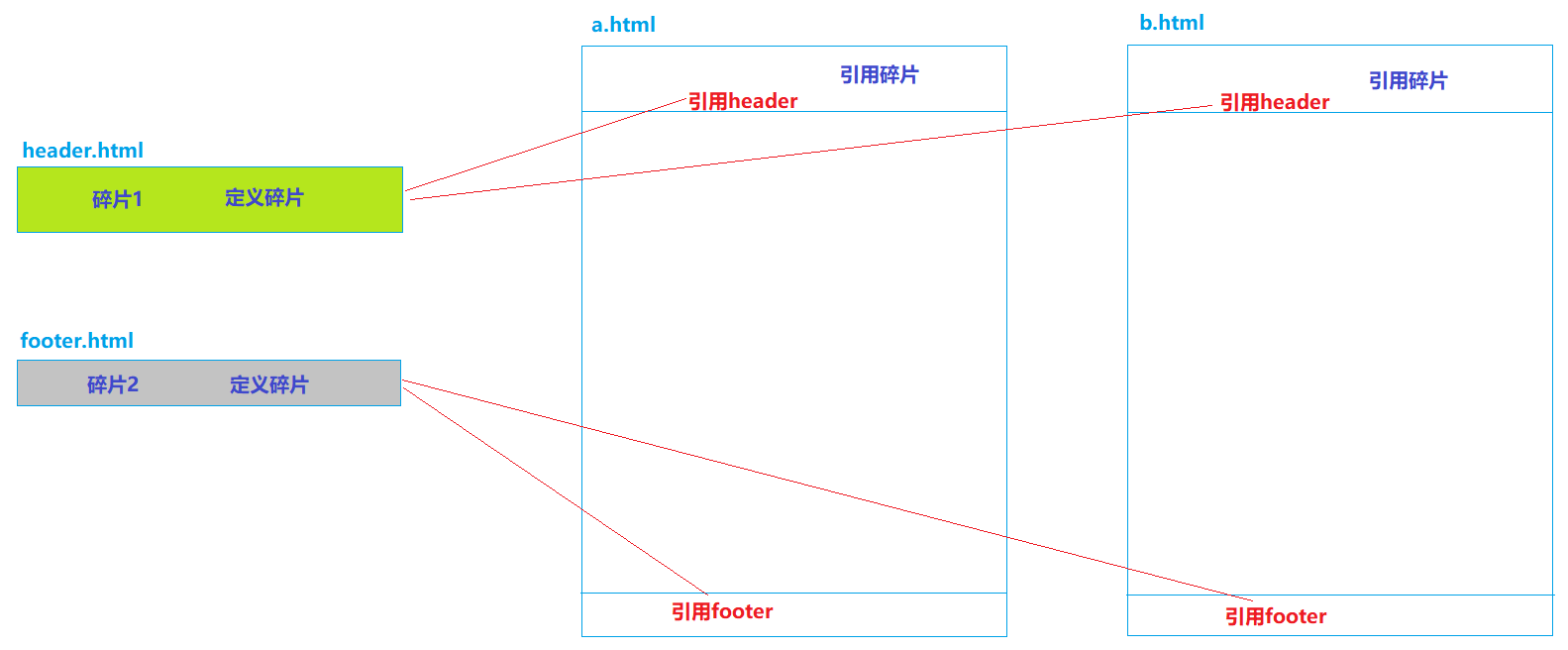
碎片,就是 HTML 片段。我们可以将多个页面中使用的相同的 HTML 标签部分单独定义,然后通过 th:include 或 th:replace 在 HTML 网页中引入定义的碎片。
3.5.2 碎片使用案例
定义碎片使用 th:fragment。header.html:
<!DOCTYPE html>
<html lang="en" xmlns:th="http://www.thymeleaf.org">
<head>
    <meta charset="UTF-8">
    <title>Title</title>
</head>
<body>

<div th:fragment="fragment1" style="width: 100%; height: 80px;background: deepskyblue; color:white; font-size: 25px;">
    千锋,六六六!!!
</div>

</body>
</html>footer.html:
<!DOCTYPE html>
<html lang="en" xmlns:th="http://www.thymeleaf.org">
<head>
    <meta charset="UTF-8">
    <title>Title</title>
</head>
<body>

<div th:fragment="fragment2" style="width: 100%; height: 30px;background: lightgray; color:white; font-size: 16px;">
    千锋教育
</div>

</body>
</html>
引用碎片使用 th:include 和 th:replace。a.html:
<!DOCTYPE html>
<html lang="en" xmlns:th="http://www.thymeleaf.org">
<head>
    <meta charset="UTF-8">
    <title>Title</title>
</head>
<body>

<!--    <div th:include="header::fragment1"></div>-->
    <div th:replace="header::fragment1"></div>

    <div style="width: 100%; height: 500px">
        定义内容
    </div>

<!--    <div th:include="footer::fragment2"></div>-->
    <div th:replace="footer::fragment2"></div>
</body>
</html>
注
th:include 会把碎片内容嵌入当前标签内部(保留当前标签本身);th:replace 则用碎片整体替换当前标签。实际开发中 th:replace 更常用。
4. SpringBoot 应用的热部署配置
"热"——不用停掉现有操作就可以进行"修改"的一种技术。类比硬件:USB 支持热插拔,PS2 接口不支持热插拔。
4.1 什么是热部署
项目首次部署、服务启动之后,如果应用发生了变化、而且 IDEA 感知到了应用的变化,就自动完成 jar 的更新,无需手动再次启动服务器,就可以访问应用的更新内容。
目的:提高开发效率。
4.2 热部署配置
4.2.1 IDEA 配置
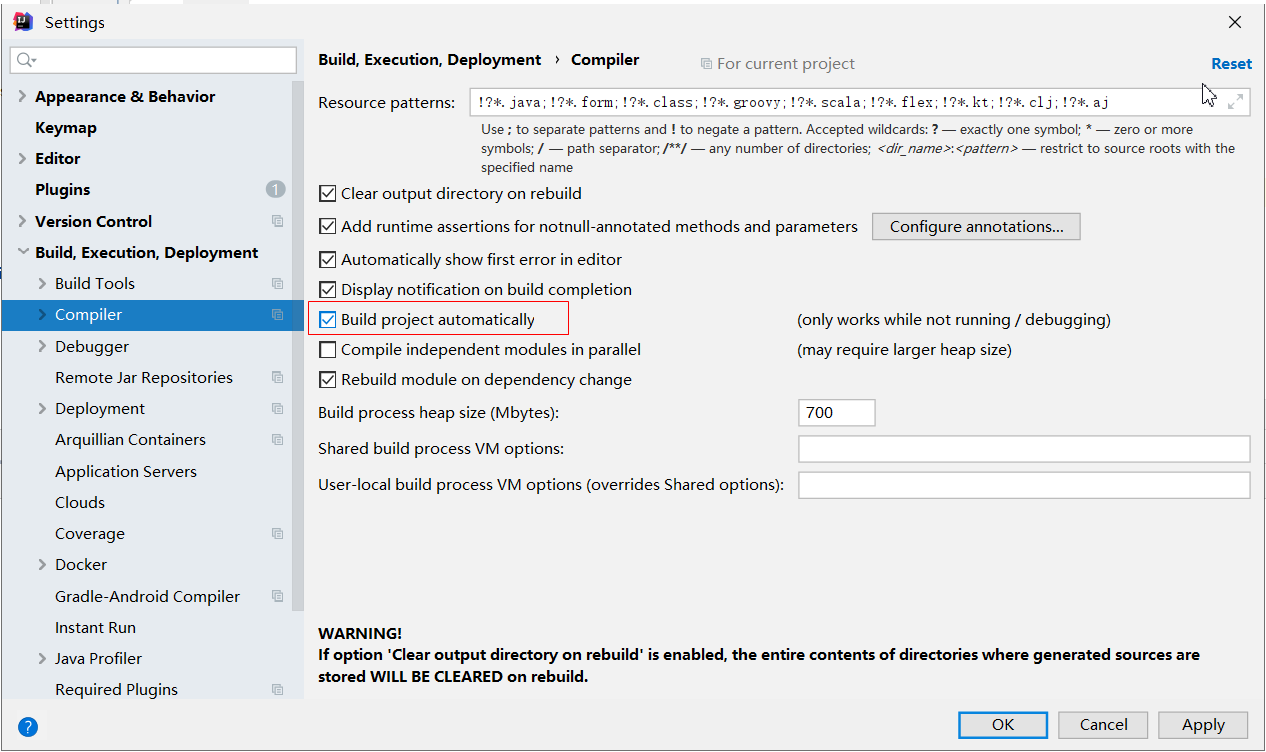
打开 File —— Settings,开启自动构建选项:
4.2.2 SpringBoot 项目配置
在需要进行热部署的 SpringBoot 应用中添加依赖:
<dependency>
    <groupId>org.springframework.boot</groupId>
    <artifactId>spring-boot-devtools</artifactId>
</dependency>
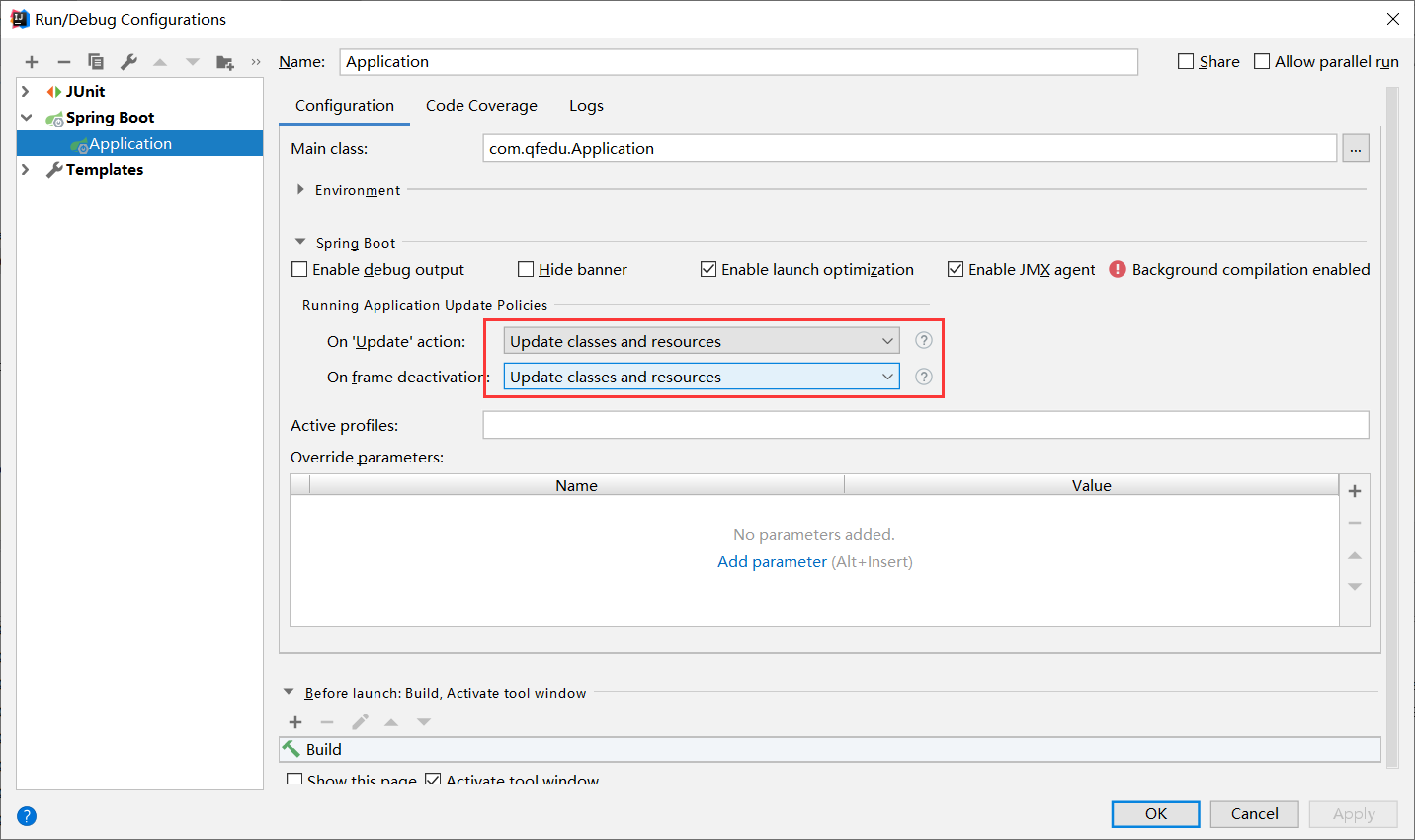
再配置 SpringBoot 应用在运行时的变化更新策略:
5. 本章小结
- SpringBoot 默认不支持 JSP,整合 JSP 需要引入
tomcat-embed-jasper与jstl并以 war 方式打包; - 基于 SpringBoot 的 SSM 整合核心步骤:引入 starter 依赖 —— 配置数据源与 MyBatis —— 创建实体类与 Mapper —— 启动类加
@MapperScan; - Thymeleaf 兼具静态预览与动态渲染能力,核心语法是
th:text、th:each、th:if、th:switch与链接表达式@{...}; - 页面公共部分用碎片(
th:fragment+th:replace)复用; - 引入
spring-boot-devtools并配置 IDEA 自动构建,即可实现热部署。