
MybatisPlus
MybatisPlus
本篇介绍 MyBatis-Plus(MP):先了解它的定位与特性,然后以 Spring 整合 MyBatis 为基础加入 MP 完成入门案例,再学习 BaseMapper 与 IService 提供的 CRUD 接口、常用注解、条件构造器、分页插件和代码生成器。
1. 了解Mybatis-Plus
1.1 Mybatis-Plus介绍
MyBatis-Plus(简称 MP)是一个 MyBatis 的增强工具,在 MyBatis 的基础上只做增强不做改变,为简化开发、提高效率而生。
提示
官方的愿景是:成为 MyBatis 最好的搭档,就像魂斗罗中的 1P、2P,基友搭配,效率翻倍。

1.2 特性
- 无侵入:只做增强不做改变,引入它不会对现有工程产生影响,如丝般顺滑;
- 损耗小:启动即会自动注入基本 CRUD,性能基本无损耗,直接面向对象操作;
- 强大的 CRUD 操作:内置通用 Mapper、通用 Service,仅仅通过少量配置即可实现单表大部分 CRUD 操作,更有强大的条件构造器,满足各类使用需求;
- 支持 Lambda 形式调用:通过 Lambda 表达式,方便地编写各类查询条件,无需再担心字段写错;
- 支持多种数据库:支持 MySQL、MariaDB、Oracle、DB2、H2、HSQL、SQLite、Postgre、SQLServer2005、SQLServer 等多种数据库;
- 支持主键自动生成:支持多达 4 种主键策略(内含分布式唯一 ID 生成器 - Sequence),可自由配置,完美解决主键问题;
- 支持 XML 热加载:Mapper 对应的 XML 支持热加载,对于简单的 CRUD 操作,甚至可以无 XML 启动;
- 支持 ActiveRecord 模式:支持 ActiveRecord 形式调用,实体类只需继承 Model 类即可进行强大的 CRUD 操作;
- 支持自定义全局通用操作:支持全局通用方法注入(Write once, use anywhere);
- 支持关键词自动转义:支持数据库关键词(order、key……)自动转义,还可自定义关键词;
- 内置代码生成器:采用代码或者 Maven 插件可快速生成 Mapper、Model、Service、Controller 层代码,支持模板引擎,更有超多自定义配置等您来使用;
- 内置分页插件:基于 MyBatis 物理分页,开发者无需关心具体操作,配置好插件之后,写分页等同于普通 List 查询;
- 内置性能分析插件:可输出 SQL 语句以及其执行时间,建议开发测试时启用该功能,能快速揪出慢查询;
- 内置全局拦截插件:提供全表 delete、update 操作智能分析阻断,也可自定义拦截规则,预防误操作;
- 内置 Sql 注入剥离器:支持 SQL 注入剥离,有效预防 SQL 注入攻击。
1.3 支持的数据库
任何能使用 MyBatis 进行 CRUD,并且支持标准 SQL 的数据库,具体支持情况如下:
- MySQL,Oracle,DB2,H2,HSQL,SQLite,PostgreSQL,SQLServer,Phoenix,Gauss,ClickHouse,Sybase,OceanBase,Firebird,Cubrid,Goldilocks,csiidb;
- 达梦数据库,虚谷数据库,人大金仓数据库,南大通用(华库)数据库,南大通用数据库,神通数据库,瀚高数据库。
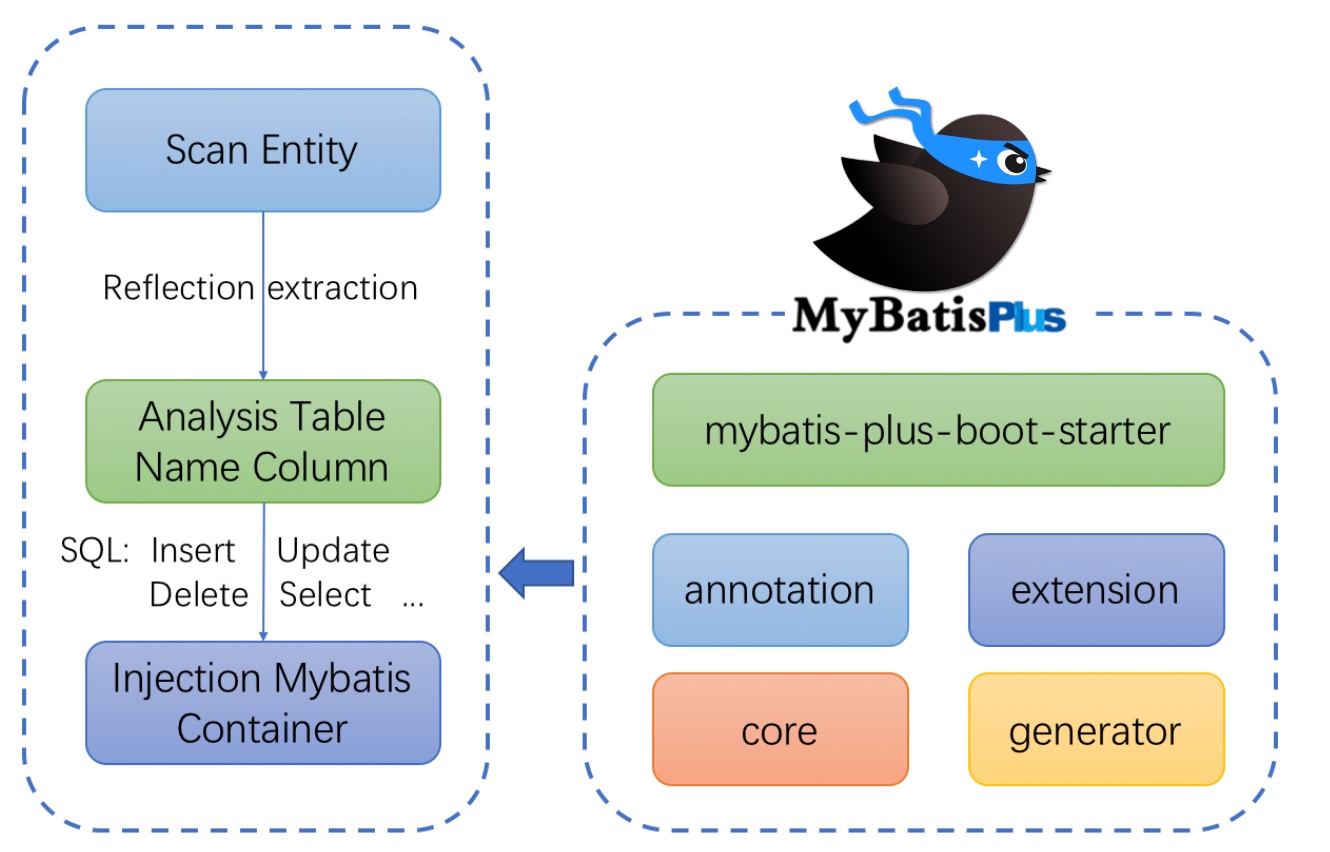
1.4 框架结构
2. 入门案例
MyBatis-Plus 官方推荐使用 Spring Boot,在此我们以 Spring 整合 MyBatis 为基础,再加入 MyBatis-Plus,以此来学习 MyBatis-Plus 相关内容。
开发环境:
| 环境 | 版本 |
|---|---|
| JDK | JDK8+ |
| 构建工具 | Maven 3.6.3 |
| MySQL | 5.7+ |
| Spring | 5.2.6.RELEASE |
2.1 创建数据库以及表
-- 创建测试表
DROP TABLE IF EXISTS user;

CREATE TABLE user (
    id BIGINT(20) NOT NULL COMMENT '主键ID',
    name VARCHAR(30) NULL DEFAULT NULL COMMENT '姓名',
    age INT(11) NULL DEFAULT NULL COMMENT '年龄',
    email VARCHAR(50) NULL DEFAULT NULL COMMENT '邮箱',
    PRIMARY KEY (id)
);

-- 插入测试数据
DELETE FROM user;

INSERT INTO user (id, name, age, email) VALUES
(1, 'Jone', 18, 'test1@baomidou.com'),
(2, 'Jack', 20, 'test2@baomidou.com'),
(3, 'Tom', 28, 'test3@baomidou.com'),
(4, 'Sandy', 21, 'test4@baomidou.com'),
(5, 'Billie', 24, 'test5@baomidou.com');
2.2 创建工程
新建普通 Maven 项目,不要选择 Maven 骨架。引入 MyBatis-Plus 之后请不要再次引入 MyBatis 以及 MyBatis-Spring,以避免因版本差异导致的问题。pom.xml 配置如下:
<?xml version="1.0" encoding="UTF-8"?>
<project xmlns="http://maven.apache.org/POM/4.0.0"
         xmlns:xsi="http://www.w3.org/2001/XMLSchema-instance"
         xsi:schemaLocation="http://maven.apache.org/POM/4.0.0 http://maven.apache.org/xsd/maven-4.0.0.xsd">
    <modelVersion>4.0.0</modelVersion>

    <groupId>com.qfedu</groupId>
    <artifactId>mybatisplus_test</artifactId>
    <version>1.0.0</version>

    <properties>
        <maven.compiler.source>8</maven.compiler.source>
        <maven.compiler.target>8</maven.compiler.target>
        <spring.version>5.2.6.RELEASE</spring.version>
        <mybatis-plus.version>3.5.1</mybatis-plus.version>
    </properties>

    <dependencies>
        <dependency>
            <groupId>org.springframework</groupId>
            <artifactId>spring-context</artifactId>
            <version>${spring.version}</version>
        </dependency>
        <dependency>
            <groupId>org.springframework</groupId>
            <artifactId>spring-test</artifactId>
            <version>${spring.version}</version>
        </dependency>
        <dependency>
            <groupId>org.springframework</groupId>
            <artifactId>spring-jdbc</artifactId>
            <version>${spring.version}</version>
        </dependency>
        <dependency>
            <groupId>com.baomidou</groupId>
            <artifactId>mybatis-plus</artifactId>
            <version>${mybatis-plus.version}</version>
        </dependency>
        <dependency>
            <groupId>mysql</groupId>
            <artifactId>mysql-connector-java</artifactId>
            <version>5.1.49</version>
            <scope>runtime</scope>
        </dependency>
        <dependency>
            <groupId>com.alibaba</groupId>
            <artifactId>druid</artifactId>
            <version>1.2.4</version>
        </dependency>
        <dependency>
            <groupId>org.projectlombok</groupId>
            <artifactId>lombok</artifactId>
            <version>1.18.22</version>
        </dependency>
        <dependency>
            <groupId>log4j</groupId>
            <artifactId>log4j</artifactId>
            <version>1.2.17</version>
        </dependency>
        <dependency>
            <groupId>junit</groupId>
            <artifactId>junit</artifactId>
            <version>4.12</version>
            <scope>test</scope>
        </dependency>
    </dependencies>
</project>
2.3 Spring整合MyBatis
2.3.1 创建实体
@Data
@NoArgsConstructor
@AllArgsConstructor
public class User {
    private Long id;
    private String name;
    private Integer age;
    private String email;
}
2.3.2 创建jdbc.properties
jdbc.driver=com.mysql.jdbc.Driver
jdbc.url=jdbc:mysql://localhost:3306/mybatisplus?useSSL=false&useUnicode=true&characterEncoding=UTF-8
jdbc.username=root
jdbc.password=root
2.3.3 创建Spring核心配置文件
<?xml version="1.0" encoding="UTF-8"?>
<beans xmlns="http://www.springframework.org/schema/beans"
       xmlns:xsi="http://www.w3.org/2001/XMLSchema-instance"
       xmlns:context="http://www.springframework.org/schema/context"
       xsi:schemaLocation="http://www.springframework.org/schema/beans
            http://www.springframework.org/schema/beans/spring-beans.xsd
            http://www.springframework.org/schema/context
            http://www.springframework.org/schema/context/spring-context.xsd">
    <!-- 引入连接池配置文件 -->
    <context:property-placeholder location="classpath:jdbc.properties" />

    <!-- 包扫描 -->
    <context:component-scan base-package="com.qfedu.service.impl" />

    <!-- 配置连接池 -->
    <bean id="dataSource" class="com.alibaba.druid.pool.DruidDataSource">
        <property name="driverClassName" value="${jdbc.driver}" />
        <property name="url" value="${jdbc.url}" />
        <property name="username" value="${jdbc.username}" />
        <property name="password" value="${jdbc.password}" />
    </bean>
    <!--
        配置SqlSessionFactory
    -->
    <bean id="sqlSessionFactory" class="org.mybatis.spring.SqlSessionFactoryBean">
        <!-- 配置连接池 -->
        <property name="dataSource" ref="dataSource" />
        <!-- 配置别名 -->
        <property name="typeAliasesPackage" value="com.qfedu.bean" />
        <!-- 加载MyBatis的配置文件 -->
        <property name="configLocation" value="classpath:SqlMapConfig.xml" />
    </bean>
    <!--
        配置mapper接口的扫描配置
        由mybatis-spring提供,可以将指定包下所有的mapper接口创建动态代理
        并将这些动态代理作为IOC容器的bean管理
    -->
    <bean id="mapperScanner" class="org.mybatis.spring.mapper.MapperScannerConfigurer">
        <property name="basePackage" value="com.qfedu.mapper" />
    </bean>
</beans>
2.3.4 创建MyBatis核心配置文件
<?xml version="1.0" encoding="UTF-8" ?>
<!DOCTYPE configuration
        PUBLIC "-//mybatis.org//DTD Config 3.0//EN"
        "http://mybatis.org/dtd/mybatis-3-config.dtd">
<configuration>
    <settings>
        <!-- 打印查询语句 -->
        <setting name="logImpl" value="LOG4J" />
    </settings>
</configuration>
2.3.5 创建Mapper接口
import com.qfedu.bean.User;
import java.util.List;

public interface UserMapper {
    List<User> findAll();
}
2.3.6 创建Mapper映射文件
<?xml version="1.0" encoding="UTF-8" ?>
<!DOCTYPE mapper PUBLIC "-//mybatis.org//DTD Mapper 3.0//EN" "http://mybatis.org/dtd/mybatis-3-mapper.dtd" >
<mapper namespace="com.qfedu.mapper.UserMapper">
    <select id="findAll" resultType="user">
        select * from user
    </select>
</mapper>
2.3.7 创建Service接口及其实现类
public interface UserService {
    List<User> findAll();
}@Service
public class UserServiceImpl implements UserService {
@Autowired
private UserMapper userMapper;
@Override
public List<User> findAll() {
return userMapper.findAll();
}
}2.3.8 增加log4j配置文件
### direct log messages to stdout ###
log4j.appender.stdout=org.apache.log4j.ConsoleAppender
log4j.appender.stdout.Target=System.err
log4j.appender.stdout.layout=org.apache.log4j.PatternLayout
log4j.appender.stdout.layout.ConversionPattern=%d{ABSOLUTE} %5p %c{1}:%L - %m%n

### set log levels - for more verbose logging change 'info' to 'debug' ###
log4j.rootLogger=debug, stdout
2.3.9 测试
// Spring整合Junit
@RunWith(SpringJUnit4ClassRunner.class)
@ContextConfiguration(locations = "classpath:beans.xml")
public class MyTest {
    @Autowired
    private UserMapper userMapper;

    @Autowired
    private UserService userService;

    @Test
    public void test1() {
        userMapper.findAll().forEach(System.out::println);
    }

    @Test
    public void test2() {
        userService.findAll().forEach(System.out::println);
    }
}
2.4 加入MyBatis-Plus
2.4.1 修改Spring核心配置文件
只需把 SqlSessionFactory 的实现类从 SqlSessionFactoryBean 调整为 MyBatis-Plus 提供的 MybatisSqlSessionFactoryBean,其余配置不变:
<?xml version="1.0" encoding="UTF-8"?>
<beans xmlns="http://www.springframework.org/schema/beans"
       xmlns:xsi="http://www.w3.org/2001/XMLSchema-instance"
       xmlns:context="http://www.springframework.org/schema/context"
       xsi:schemaLocation="http://www.springframework.org/schema/beans
            http://www.springframework.org/schema/beans/spring-beans.xsd
            http://www.springframework.org/schema/context
            http://www.springframework.org/schema/context/spring-context.xsd">
    <!-- 引入连接池配置文件 -->
    <context:property-placeholder location="classpath:jdbc.properties" />

    <!-- 包扫描 -->
    <context:component-scan base-package="com.qfedu.service.impl" />

    <!-- 配置连接池 -->
    <bean id="dataSource" class="com.alibaba.druid.pool.DruidDataSource">
        <property name="driverClassName" value="${jdbc.driver}" />
        <property name="url" value="${jdbc.url}" />
        <property name="username" value="${jdbc.username}" />
        <property name="password" value="${jdbc.password}" />
    </bean>
    <!--
        配置SqlSessionFactory
        调整SqlSessionFactory为MyBatis-Plus的SqlSessionFactory
    -->
    <bean id="sqlSessionFactory" class="com.baomidou.mybatisplus.extension.spring.MybatisSqlSessionFactoryBean">
        <!-- 配置连接池 -->
        <property name="dataSource" ref="dataSource" />
        <!-- 配置别名 -->
        <property name="typeAliasesPackage" value="com.qfedu.bean" />
        <!-- 加载MyBatis的配置文件 -->
        <property name="configLocation" value="classpath:SqlMapConfig.xml" />
        <!-- <property name="globalConfig" ref="globalConfig" /> -->
    </bean>
    <!--
        配置mapper接口的扫描配置
        由mybatis-spring提供,可以将指定包下所有的mapper接口创建动态代理
        并将这些动态代理作为IOC容器的bean管理
    -->
    <bean id="mapperScanner" class="org.mybatis.spring.mapper.MapperScannerConfigurer">
        <property name="basePackage" value="com.qfedu.mapper" />
    </bean>
</beans>
2.4.2 创建Mapper接口
import com.baomidou.mybatisplus.core.mapper.BaseMapper;
import com.qfedu.bean.User;

public interface UserMapper extends BaseMapper<User> {
}
注
BaseMapper<T> 是 MyBatis-Plus 提供的基础 Mapper 接口,泛型为所操作的实体类型,其中包括 CRUD 的各种方法。我们的 Mapper 继承 BaseMapper 之后,就可以直接使用它提供的各种方法,而不需要编写映射文件以及 SQL 语句,大大提高了开发效率。
如果要完成 BaseMapper 没有的功能,还是要像之前一样定义接口方法、编写 Mapper 映射文件。
2.4.3 测试
@RunWith(SpringJUnit4ClassRunner.class)
@ContextConfiguration(locations = "classpath:beans.xml")
public class MyTest {
    @Autowired
    private UserMapper userMapper;

    @Test
    public void test1() {
        // 查询所有
        List<User> userList = userMapper.selectList(null);
        userList.forEach(System.out::println);
    }
}
提示
小结:在 Spring 整合 MyBatis 中加入 MyBatis-Plus 后,我们就可以使用 MP 提供的 BaseMapper 实现 CRUD,不需要编写映射文件以及 SQL 语句。若要自定义 SQL 语句,仍然可以编写映射文件而不造成任何影响——因为 MyBatis-Plus 只做增强,不做改变。
3. CRUD接口
3.1 Mapper CRUD接口
3.1.1 Insert
// 插入一条记录
int insert(T entity);
参数说明
| 类型 | 参数名 | 描述 |
|---|---|---|
| T | entity | 实体对象 |
案例
@Test
public void testInsert() {
    User user = new User(null, "张三", 20, "zs@126.com");
    // INSERT INTO user ( id, name, age, email ) VALUES ( ?, ?, ?, ? )
    int result = userMapper.insert(user);

    System.out.println(user);
    System.out.println(result);
}
注
最终执行的结果,所获取的 id 为 1500813820996714498,这是因为 MyBatis-Plus 在实现插入数据时,会默认基于雪花算法的策略生成 id。
3.1.2 Delete
// 根据 entity 条件,删除记录
int delete(@Param(Constants.WRAPPER) Wrapper<T> wrapper);
// 删除(根据ID 批量删除)
int deleteBatchIds(@Param(Constants.COLLECTION) Collection<? extends Serializable> idList);
// 根据 ID 删除
int deleteById(Serializable id);
// 根据 columnMap 条件,删除记录
int deleteByMap(@Param(Constants.COLUMN_MAP) Map<String, Object> columnMap);
参数说明
| 类型 | 参数名 | 描述 |
|---|---|---|
Wrapper<T> | wrapper | 实体对象封装操作类(可以为 null) |
| Collection<? extends Serializable> | idList | 主键 ID 列表(不能为 null 以及 empty) |
| Serializable | id | 主键 ID |
| Map<String, Object> | columnMap | 表字段 map 对象 |
案例
@Test
public void testDeleteById() {
    // DELETE FROM user WHERE id=?
    int i = userMapper.deleteById(1500092790474260482L);
    System.out.println(i);
}

@Test
public void testDeleteBatchIds() {
    // DELETE FROM user WHERE id IN ( ? , ? , ? )
    Long[] ids = {1500093260177522689L, 1500093259107975169L, 1500093260244631554L};
    int i = userMapper.deleteBatchIds(Arrays.asList(ids));
    System.out.println(i);
}

@Test
public void testDeleteByMap() {
    // DELETE FROM user WHERE name = ? AND age = ?
    Map<String, Object> map = new HashMap<>();
    map.put("age", 60);
    map.put("name", "张三40");

    int i = userMapper.deleteByMap(map);
    System.out.println(i);
}
3.1.3 Update
// 根据 whereWrapper 条件,更新记录
int update(@Param(Constants.ENTITY) T updateEntity, @Param(Constants.WRAPPER) Wrapper<T> whereWrapper);
// 根据 ID 修改
int updateById(@Param(Constants.ENTITY) T entity);
参数说明
| 类型 | 参数名 | 描述 |
|---|---|---|
| T | entity | 实体对象(set 条件值,可为 null) |
Wrapper<T> | updateWrapper | 实体对象封装操作类(可以为 null,里面的 entity 用于生成 where 语句) |
案例
@Test
public void testUpdateById() {
    // UPDATE user SET name=?, age=? WHERE id=?
    User user = new User(1500813820996714498L, "zs", 20, null);
    int i = userMapper.updateById(user);
    System.out.println(i);
}
3.1.4 Select
// 根据 ID 查询
T selectById(Serializable id);
// 根据 entity 条件,查询一条记录
T selectOne(@Param(Constants.WRAPPER) Wrapper<T> queryWrapper);

// 查询(根据ID 批量查询)
List<T> selectBatchIds(@Param(Constants.COLLECTION) Collection<? extends Serializable> idList);
// 根据 entity 条件,查询全部记录
List<T> selectList(@Param(Constants.WRAPPER) Wrapper<T> queryWrapper);
// 查询(根据 columnMap 条件)
List<T> selectByMap(@Param(Constants.COLUMN_MAP) Map<String, Object> columnMap);
// 根据 Wrapper 条件,查询全部记录
List<Map<String, Object>> selectMaps(@Param(Constants.WRAPPER) Wrapper<T> queryWrapper);
// 根据 Wrapper 条件,查询全部记录。注意:只返回第一个字段的值
List<Object> selectObjs(@Param(Constants.WRAPPER) Wrapper<T> queryWrapper);

// 根据 entity 条件,查询全部记录(并翻页)
IPage<T> selectPage(IPage<T> page, @Param(Constants.WRAPPER) Wrapper<T> queryWrapper);
// 根据 Wrapper 条件,查询全部记录(并翻页)
IPage<Map<String, Object>> selectMapsPage(IPage<T> page, @Param(Constants.WRAPPER) Wrapper<T> queryWrapper);
// 根据 Wrapper 条件,查询总记录数
Integer selectCount(@Param(Constants.WRAPPER) Wrapper<T> queryWrapper);
参数说明
| 类型 | 参数名 | 描述 |
|---|---|---|
| Serializable | id | 主键 ID |
Wrapper<T> | queryWrapper | 实体对象封装操作类(可以为 null) |
| Collection<? extends Serializable> | idList | 主键 ID 列表(不能为 null 以及 empty) |
| Map<String, Object> | columnMap | 表字段 map 对象 |
IPage<T> | page | 分页查询条件(可以为 RowBounds.DEFAULT) |
通过观察 BaseMapper 中的方法,大多数方法中都有 Wrapper 类型的形参,此为条件构造器,可针对 SQL 语句设置不同的条件;若没有条件,则可以为该形参赋值 null,即查询(删除/修改)所有数据。
案例
@Test
public void testSelectById() {
    // SELECT id,name,age,email FROM user WHERE id=?
    User user = userMapper.selectById(1500813820996714498L);
    System.out.println(user);
}

@Test
public void testSelectBatchIds() {
    // SELECT id,name,age,email FROM user WHERE id IN ( ? , ? , ? )
    List<User> users = userMapper.selectBatchIds(Arrays.asList(1L, 2L, 3L));
    users.forEach(System.out::println);
}

@Test
public void testSelectByMap() {
    Map<String, Object> map = new HashMap<>();
    map.put("age", 61);
    map.put("name", "张三41");
    // SELECT id,name,age,email FROM user WHERE name = ? AND age = ?
    List<User> users = userMapper.selectByMap(map);
    System.out.println(users);
}
3.2 Service CRUD接口
说明:
- 通用 Service CRUD 封装
IService接口,进一步封装 CRUD,采用get 查询单行、remove 删除、list 查询集合、page 分页的前缀命名方式区分 Mapper 层,避免混淆; - 泛型
T为任意实体对象; - 建议如果存在自定义通用 Service 方法的可能,请创建自己的
IBaseService继承 MyBatis-Plus 提供的基类; - 对象
Wrapper为条件构造器。
3.2.1 创建Service接口和实现类
// UserService继承IService模板提供的基础功能
public interface UserService extends IService<User> {
}
/**
* ServiceImpl实现了IService,提供了IService中基础功能的实现
* 若ServiceImpl无法满足业务需求,则可以使用自定义的UserService定义方法,并在实现类中实现
*/
@Service
public class UserServiceImpl extends ServiceImpl<UserMapper, User> implements UserService {
}3.2.2 测试
@RunWith(SpringJUnit4ClassRunner.class)
@ContextConfiguration(locations = "classpath:beans.xml")
public class MyTest1 {
    @Autowired
    private UserService userService;

    @Test
    public void testSave() {
        User user = new User(null, "ls", 21, "abcd@126.com");
        boolean save = userService.save(user);
        System.out.println(save);
    }

    @Test
    public void testSaveOrUpdate() {
        User user = new User(100L, "tom", 22, "zs22@126.com");
        boolean result = userService.saveOrUpdate(user);
        System.out.println(result);
    }

    @Test
    public void testCount() {
        long count = userService.count();
        System.out.println(count);
    }

    @Test
    public void testSaveBatch() {
        ArrayList<User> users = new ArrayList<>();
        for (int i = 0; i < 5; i++) {
            User user = new User();
            user.setName("zs" + i);
            user.setAge(20 + i);
            users.add(user);
        }
        userService.saveBatch(users);
    }
}
4. 常用注解
4.1 @TableName
4.1.1 如何使用
经过以上的测试,在使用 MyBatis-Plus 实现基本的 CRUD 时,我们并没有指定要操作的表,只是在 Mapper 接口继承 BaseMapper 时设置了泛型 User,而操作的表为 user 表。
由此得出结论:MyBatis-Plus 在确定操作的表时,由 BaseMapper 的泛型决定,即实体类型决定,且默认操作的表名和实体类型的类名一致。
若实体类类型的类名和要操作的表的表名不一致,程序抛出异常。
为了解决上面的问题,在实体类类型上添加 @TableName("表名"),标识实体类对应的表,即可成功执行 SQL 语句。
@Data
@NoArgsConstructor
@AllArgsConstructor
@TableName("tb_user")
public class User {
    private Long id;
    private String name;
    private Integer age;
    private String email;
}
4.1.2 通过GlobalConfig批量添加前缀
在开发的过程中,我们经常遇到以上问题,即实体类所对应的表都有固定的前缀,例如 t_ 或 tb_。
此时,可以使用 MyBatis-Plus 提供的全局配置,为实体类所对应的表名设置默认的前缀,那么就不需要在每个实体类上通过 @TableName 标识实体类对应的表。
<bean id="sqlSessionFactory" class="com.baomidou.mybatisplus.extension.spring.MybatisSqlSessionFactoryBean">
    <!-- 配置连接池 -->
    <property name="dataSource" ref="dataSource" />
    <!-- 配置别名 -->
    <property name="typeAliasesPackage" value="com.qfedu.bean" />
    <!-- 加载MyBatis的配置文件 -->
    <property name="configLocation" value="classpath:SqlMapConfig.xml" />
    <!-- MyBatis-Plus 全局策略配置 -->
    <property name="globalConfig" ref="globalConfig" />
</bean>

<bean id="globalConfig" class="com.baomidou.mybatisplus.core.config.GlobalConfig">
    <property name="dbConfig" ref="dbConfig" />
</bean>

<bean id="dbConfig" class="com.baomidou.mybatisplus.core.config.GlobalConfig$DbConfig">
    <property name="tablePrefix" value="tb_" />
</bean>
4.2 @TableId
4.2.1 基本使用
经过以上的测试,MyBatis-Plus 在实现 CRUD 时,会默认将 id 作为主键列,并在插入数据时,默认基于雪花算法的策略生成 id。
若实体类和表中表示主键的不是 id,而是其他字段——我们将实体类中的属性 id 改为 uid,将表中的字段 id 也改为 uid——程序抛出异常。
在实体类的 uid 属性上通过 @TableId 将其标识为主键,即可成功执行 SQL 语句。
@Data
@NoArgsConstructor
@AllArgsConstructor
@TableName("tb_user")
public class User {
    @TableId
    private Long uid;
    private String name;
    private Integer age;
    private String email;
}
4.2.2 value属性
若实体类中主键对应的属性为 id,而表中表示主键的字段为 uid,此时若只在属性 id 上添加注解 @TableId,则抛出异常 Unknown column 'id' in 'field list',即 MyBatis-Plus 仍然会将 id 作为表的主键操作,而表中表示主键的字段是 uid。
此时需要通过 @TableId 注解的 value 属性,指定表中的主键字段:@TableId("uid") 或 @TableId(value = "uid")。
@Data
@NoArgsConstructor
@AllArgsConstructor
@TableName("tb_user")
public class User {
    @TableId(value = "uid")
    private Long id;
    private String name;
    private Integer age;
    private String email;
}
4.2.3 type属性
作用:指定主键类型。
| 值 | 描述 |
|---|---|
| IdType.AUTO | 数据库 ID 自增 |
| IdType.NONE | 无状态,该类型为未设置主键类型(注解里等于跟随全局,全局里约等于 INPUT) |
| IdType.INPUT | insert 前自行 set 主键值 |
| IdType.ASSIGN_ID | 分配 ID(主键类型为 Number(Long 和 Integer) 或 String)(since 3.3.0),使用接口 IdentifierGenerator 的方法 nextId(默认实现类为 DefaultIdentifierGenerator 雪花算法) |
| IdType.ASSIGN_UUID | 分配 UUID,主键类型为 String(since 3.3.0),使用接口 IdentifierGenerator 的方法 nextUUID(默认 default 方法) |
关于雪花算法的详细讲解,可参考:面试官:讲讲雪花算法,越详细越好。
4.3 @TableField
MyBatis-Plus 在执行 SQL 语句时,要保证实体类中的属性名和表中的字段名一致。如果实体类中的属性名和字段名不一致,会出现什么问题呢?
情况一:若实体类中的属性使用的是驼峰命名风格,而表中的字段使用的是下划线命名风格,例如实体类属性 userName,表中字段 user_name,此时 MyBatis-Plus 会自动将下划线命名风格转化为驼峰命名风格,无需额外配置。
情况二:若实体类中的属性和表中的字段不满足情况一,例如实体类属性 name,表中字段 username,此时需要在实体类属性上使用 @TableField("username") 设置属性所对应的列名。
@Data
@NoArgsConstructor
@AllArgsConstructor
@TableName("tb_user")
public class User {
    @TableId(value = "uid")
    private Long id;
    @TableField("username")
    private String name;
    private Integer age;
    private String email;
}
4.4 @TableLogic
4.4.1 关于删除
- 物理删除:真实删除,将对应数据从数据库中删除,之后查询不到此条被删除的数据;
- 逻辑删除:假删除,将对应数据中代表是否被删除的字段状态修改为"被删除状态",之后在数据库中仍旧能看到此条数据记录;
- 使用场景:可以进行数据恢复。
4.4.2 实现逻辑删除
步骤:
- 数据库中创建逻辑删除状态列(
is_deleted),设置默认值为 0; - 实体类中添加逻辑删除属性,并在该属性上添加
@TableLogic注解。
@Data
@NoArgsConstructor
@AllArgsConstructor
@TableName("tb_user")
public class User {
    @TableId(value = "uid")
    private Long id;
    private String name;
    private Integer age;
    private String email;
    @TableLogic
    private Integer isDeleted;
}@Test
public void testDeleteById() {
// 测试删除功能,真正执行的是修改
// UPDATE tb_user SET is_deleted=1 WHERE uid=? AND is_deleted=0
int i = userMapper.deleteById(1500822918454702085L);
System.out.println(i);
}
@Test
public void testFindAll() {
// 测试查询功能,被逻辑删除的数据默认不会被查询
// SELECT uid AS id,name,age,email,is_deleted FROM tb_user WHERE is_deleted=0
List<User> users = userMapper.selectList(null);
users.forEach(System.out::println);
}注
配置 @TableLogic 之后,MyBatis-Plus 自带的删除方法会自动变为修改逻辑删除位,查询方法会自动追加 is_deleted=0 的过滤条件,无需手动改写 SQL。
5. 条件构造器
在 MyBatis-Plus 中,Wrapper 接口的实现类关系如下:
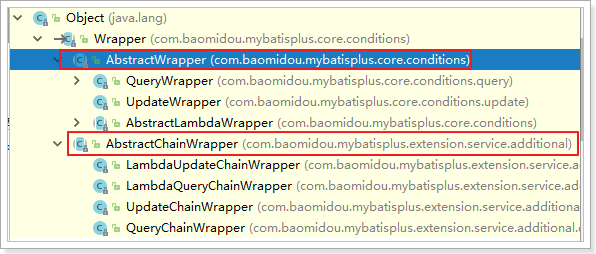
可以看到,AbstractWrapper 和 AbstractChainWrapper 是重点实现,接下来我们重点学习 AbstractWrapper 及其子类。
QueryWrapper:查询条件封装;UpdateWrapper:Update 条件封装。
5.1 组装查询条件
@Test
public void test1() {
    // 查询用户名包含a,年龄在20到30之间,并且邮箱不为null的用户信息
    // SELECT uid AS id,name,age,email,is_deleted FROM tb_user WHERE is_deleted=0 AND (name LIKE ? AND age BETWEEN ? AND ? AND email IS NOT NULL)
    QueryWrapper<User> queryWrapper = new QueryWrapper<>();
    queryWrapper.like("name", "a")
        .between("age", 20, 30)
        .isNotNull("email");
    List<User> list = userMapper.selectList(queryWrapper);
    list.forEach(System.out::println);
}
5.2 组装排序条件
@Test
public void test2() {
    // 按年龄降序查询用户,如果年龄相同则按id升序排列
    // SELECT uid AS id,name,age,email,is_deleted FROM tb_user WHERE is_deleted=0 ORDER BY age DESC,id ASC
    QueryWrapper<User> queryWrapper = new QueryWrapper<>();
    queryWrapper
        .orderByDesc("age")
        .orderByAsc("id");
    List<User> users = userMapper.selectList(queryWrapper);
    users.forEach(System.out::println);
}
5.3 组装删除条件
@Test
public void test3() {
    // 删除email为空的用户
    // UPDATE tb_user SET is_deleted=1 WHERE is_deleted=0 AND (email IS NULL)
    QueryWrapper<User> queryWrapper = new QueryWrapper<>();
    queryWrapper.isNull("email");
    // 条件构造器也可以构建删除语句的条件
    int result = userMapper.delete(queryWrapper);
    System.out.println("受影响的行数:" + result);
}
5.4 条件的优先级
@Test
public void test4() {
    QueryWrapper<User> queryWrapper = new QueryWrapper<>();
    // 将(年龄大于20并且用户名中包含有a)或邮箱为null的用户信息修改
    // UPDATE tb_user SET age=?, email=? WHERE is_deleted=0 AND (name LIKE ? AND age > ? OR email IS NULL)
    queryWrapper
        .like("name", "a")
        .gt("age", 20)
        .or()
        .isNull("email");

    User user = new User();
    user.setAge(28);
    user.setEmail("aaa@ccc.com");
    int result = userMapper.update(user, queryWrapper);
    System.out.println("受影响的行数:" + result);
}

@Test
public void test5() {
    QueryWrapper<User> queryWrapper = new QueryWrapper<>();
    // 将(年龄大于20或邮箱为null)并且用户名中包含有a的用户信息修改
    // UPDATE tb_user SET age=?, email=? WHERE is_deleted=0 AND (name LIKE ? AND (age > ? OR email IS NULL))
    // lambda表达式内的逻辑优先运算
    queryWrapper
        .like("name", "a")
        .and(i -> i.gt("age", 20).or().isNull("email"));
    User user = new User();
    user.setAge(18);
    user.setEmail("user@ccc.com");
    int result = userMapper.update(user, queryWrapper);
    System.out.println("受影响的行数:" + result);
}
5.5 组装select子句
@Test
public void test6() {
    // 查询用户信息的name和age字段
    // SELECT name,age FROM tb_user WHERE is_deleted=0
    QueryWrapper<User> queryWrapper = new QueryWrapper<>();
    queryWrapper.select("name", "age");
    // selectMaps()返回Map集合列表,通常配合select()使用,避免User对象中没有被查询到的列值为null
    List<Map<String, Object>> maps = userMapper.selectMaps(queryWrapper);
    maps.forEach(System.out::println);
}
5.6 实现子查询
@Test
public void test7() {
    // 查询年龄大于id为5的用户的年龄的所有用户信息
    // select * from tb_user where age>(select age from tb_user where id=5)
    QueryWrapper<User> wrapper = new QueryWrapper<>();
    wrapper.gtSql("age", "select age from tb_user where id=5");

    List<User> userList = userMapper.selectList(wrapper);
    userList.forEach(System.out::println);
}
5.7 UpdateWrapper
@Test
public void test8() {
    // 将(年龄大于20或邮箱为null)并且用户名中包含有a的用户信息修改
    // 组装set子句以及修改条件
    UpdateWrapper<User> updateWrapper = new UpdateWrapper<>();
    // lambda表达式内的逻辑优先运算
    updateWrapper
        .set("age", 18)
        .set("email", "user@ccc.com")
        .like("name", "a")
        .and(i -> i.gt("age", 20).or().isNull("email"));
    // 这里必须要创建User对象,否则无法应用自动填充。如果没有自动填充,可以设置为null
    // UPDATE tb_user SET name=?, age=?,email=? WHERE is_deleted=0 AND (name LIKE ? AND (age > ? OR email IS NULL))
    User user = new User();
    user.setName("张三");
    int result = userMapper.update(user, updateWrapper);
    // UPDATE tb_user SET age=?,email=? WHERE is_deleted=0 AND (name LIKE ? AND (age > ? OR email IS NULL))
    // int result = userMapper.update(null, updateWrapper);
    System.out.println(result);
}
5.8 组装条件(动态判断)
在真正开发的过程中,组装条件是常见的功能,而这些条件数据来源于用户输入,是可选的。因此我们在组装这些条件时,必须先判断用户是否选择了这些条件:若选择则需要组装该条件,若没有选择则一定不能组装,以免影响 SQL 执行的结果。
@Test
public void test9() {
    // 定义查询条件,有可能为null(用户未输入或未选择)
    String name = null;
    Integer ageBegin = 10;
    Integer ageEnd = 24;
    QueryWrapper<User> queryWrapper = new QueryWrapper<>();
    // StringUtils.isNotBlank()判断某字符串是否不为空且长度不为0且不由空白符(whitespace)构成
    if (StringUtils.isNotBlank(name)) {
        queryWrapper.like("name", name);
    }
    if (ageBegin != null) {
        queryWrapper.ge("age", ageBegin);
    }
    if (ageEnd != null) {
        queryWrapper.le("age", ageEnd);
    }
    // SELECT uid AS id,name,age,email,is_deleted FROM tb_user WHERE is_deleted=0 AND (age >= ? AND age <= ?)
    List<User> users = userMapper.selectList(queryWrapper);
    users.forEach(System.out::println);
}
上面的写法每个条件都要写一个 if,比较繁琐。实际上,条件构造器的每个方法都提供了一个带 boolean 判断参数的重载,条件成立时才拼接该条件,代码更简洁:
@Test
public void test10() {
    // 定义查询条件,有可能为null(用户未输入或未选择)
    String name = null;
    Integer ageBegin = 10;
    Integer ageEnd = 24;
    QueryWrapper<User> queryWrapper = new QueryWrapper<>();
    queryWrapper
        .like(StringUtils.isNotBlank(name), "name", name)
        .ge(ageBegin != null, "age", ageBegin)
        .le(ageEnd != null, "age", ageEnd);
    // SELECT uid AS id,name,age,email,is_deleted FROM tb_user WHERE is_deleted=0 AND (age >= ? AND age <= ?)
    List<User> users = userMapper.selectList(queryWrapper);
    users.forEach(System.out::println);
}
6. 分页插件
MyBatis-Plus 自带分页插件,只要简单的配置即可实现分页功能。
6.1 添加配置
<!-- 配置SqlSessionFactory -->
<bean id="sqlSessionFactory" class="com.baomidou.mybatisplus.extension.spring.MybatisSqlSessionFactoryBean">
    <!-- 配置连接池 -->
    <property name="dataSource" ref="dataSource" />
    <!-- 配置别名 -->
    <property name="typeAliasesPackage" value="com.qfedu.bean" />
    <!-- 加载MyBatis的配置文件 -->
    <property name="configLocation" value="classpath:SqlMapConfig.xml" />
    <property name="globalConfig" ref="globalConfig" />
    <!-- 配置插件 -->
    <property name="plugins">
        <array>
            <ref bean="mybatisPlusInterceptor"></ref>
        </array>
    </property>
</bean>

<!-- 配置MyBatis-Plus插件 -->
<bean id="mybatisPlusInterceptor"
      class="com.baomidou.mybatisplus.extension.plugins.MybatisPlusInterceptor">
    <property name="interceptors">
        <list>
            <ref bean="paginationInnerInterceptor"></ref>
        </list>
    </property>
</bean>

<!-- 配置MyBatis-Plus分页插件的bean -->
<bean id="paginationInnerInterceptor"
      class="com.baomidou.mybatisplus.extension.plugins.inner.PaginationInnerInterceptor">
    <!-- 设置数据库类型 -->
    <property name="dbType" value="MYSQL"></property>
</bean>
6.2 测试
@Test
public void test11() {
    // 设置分页参数
    Page<User> page = new Page<>(1, 5);
    // SELECT COUNT(*) AS total FROM tb_user WHERE is_deleted = 0
    // SELECT uid AS id,name,age,email,is_deleted FROM tb_user WHERE is_deleted=0 LIMIT ?,?
    userMapper.selectPage(page, null);
    // 获取分页数据
    List<User> list = page.getRecords();
    list.forEach(System.out::println);
    System.out.println("当前页:" + page.getCurrent());
    System.out.println("每页显示的条数:" + page.getSize());
    System.out.println("总记录数:" + page.getTotal());
    System.out.println("总页数:" + page.getPages());
    System.out.println("是否有上一页:" + page.hasPrevious());
    System.out.println("是否有下一页:" + page.hasNext());
}

@Test
public void test12() {
    // 设置分页参数
    Page<User> page = new Page<>(2, 5);
    // SELECT COUNT(*) AS total FROM tb_user WHERE is_deleted = 0
    // SELECT uid AS id,name,age,email,is_deleted FROM tb_user WHERE is_deleted=0 LIMIT ?,?
    userService.page(page);
    // 获取分页数据
    List<User> list = page.getRecords();
    list.forEach(System.out::println);
    System.out.println("当前页:" + page.getCurrent());
    System.out.println("每页显示的条数:" + page.getSize());
    System.out.println("总记录数:" + page.getTotal());
    System.out.println("总页数:" + page.getPages());
    System.out.println("是否有上一页:" + page.hasPrevious());
    System.out.println("是否有下一页:" + page.hasNext());
}
6.3 xml自定义分页
6.3.1 UserMapper中定义接口方法
public interface UserMapper extends BaseMapper<User> {
    /**
     * 根据年龄查询用户列表,分页显示
     * @param page page分页对象, xml中可以从里面进行取值, 传递参数Page即自动分页, 必须放在第一位
     * @param age 年龄
     * @return 分页结果
     */
    IPage<User> selectPageVo(@Param("page") Page<User> page, @Param("age") Integer age);
}
6.3.2 UserMapper.xml中编写SQL
<?xml version="1.0" encoding="UTF-8" ?>
<!DOCTYPE mapper PUBLIC "-//mybatis.org//DTD Mapper 3.0//EN" "http://mybatis.org/dtd/mybatis-3-mapper.dtd" >
<mapper namespace="com.qfedu.mapper.UserMapper">
    <select id="selectPageVo" resultType="com.qfedu.bean.User">
        SELECT
            uid AS id, name, age, email, is_deleted
        FROM
            tb_user
        WHERE
            is_deleted=0 AND age > #{age}
    </select>
</mapper>
6.3.3 测试
@Test
public void test13() {
    // 设置分页参数
    Page<User> page = new Page<>(2, 5);
    // SELECT COUNT(*) AS total FROM tb_user WHERE is_deleted = 0 AND age > ?
    // SELECT uid AS id,name,age,email,is_deleted FROM tb_user WHERE is_deleted=0 AND age > ? LIMIT ?,?
    userMapper.selectPageVo(page, 20);
    // 获取分页数据
    List<User> list = page.getRecords();
    list.forEach(System.out::println);
    System.out.println("当前页:" + page.getCurrent());
    System.out.println("每页显示的条数:" + page.getSize());
    System.out.println("总记录数:" + page.getTotal());
    System.out.println("总页数:" + page.getPages());
    System.out.println("是否有上一页:" + page.hasPrevious());
    System.out.println("是否有下一页:" + page.hasNext());
}
7. 代码生成器
AutoGenerator 是 MyBatis-Plus 的代码生成器,通过 AutoGenerator 可以快速生成 Entity、Mapper、Mapper XML、Service、Controller 等各个模块的代码,极大提升了开发效率。
7.1 添加依赖
<dependency>
    <groupId>com.baomidou</groupId>
    <artifactId>mybatis-plus-generator</artifactId>
    <version>3.5.1</version>
</dependency>
<dependency>
    <groupId>org.freemarker</groupId>
    <artifactId>freemarker</artifactId>
    <version>2.3.31</version>
</dependency>
<dependency>
    <groupId>org.slf4j</groupId>
    <artifactId>slf4j-api</artifactId>
    <version>1.7.30</version>
</dependency>
7.2 编写配置
配置写在 main 方法中就可以:
import com.baomidou.mybatisplus.generator.FastAutoGenerator;
import com.baomidou.mybatisplus.generator.config.OutputFile;
import com.baomidou.mybatisplus.generator.engine.FreemarkerTemplateEngine;

import java.util.Collections;

public class GenCode {
    public static void main(String[] args) {
        FastAutoGenerator.create("jdbc:mysql://localhost:3306/mybatisplus?useSSL=false&useUnicode=true&characterEncoding=UTF-8",
                "root",
                "root")
                .globalConfig(builder -> {
                    builder.author("rx") // 设置作者
                            .fileOverride() // 覆盖已生成文件
                            .outputDir("C://Users//Maxwell//Desktop//mycode"); // 指定输出目录
                })
                .packageConfig(builder -> {
                    builder.parent("com.qfedu") // 设置父包名
                            .pathInfo(Collections.singletonMap(OutputFile.mapperXml, "C://Users//Maxwell//Desktop//mycode//mapper//com//qfedu//mapper")); // 设置mapperXml生成路径
                })
                .strategyConfig(builder -> {
                    builder.addInclude("tb_user") // 设置需要生成的表名
                            .addTablePrefix("tb_", "t_"); // 设置过滤表前缀
                })
                .templateEngine(new FreemarkerTemplateEngine()) // 使用Freemarker引擎模板,默认的是Velocity引擎模板
                .execute();
    }
}
7.3 生成代码
运行 7.2 中的 main 方法,可以看到生成的代码。